

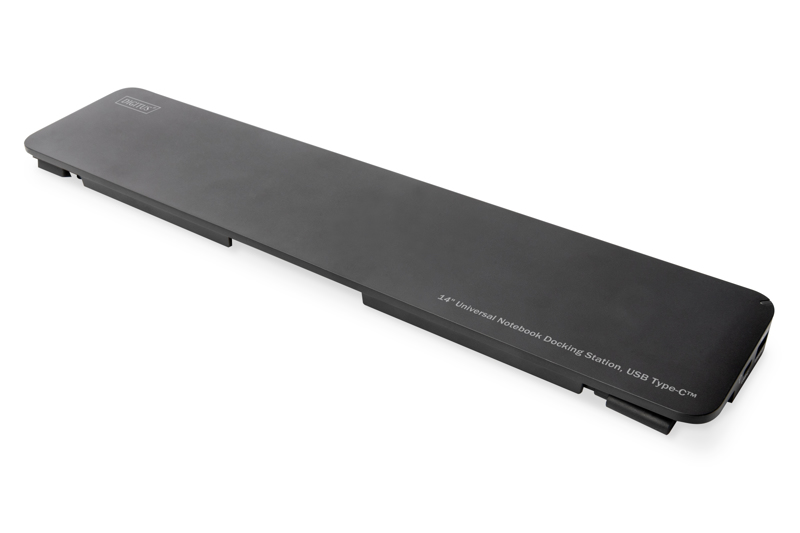
DIGITUS 14-Port USB-C Docking Station
14" Universal Notebook Docking Station - USB-C 3x video - 3x USB 3.0 - 2x USB-C - 2x USB 2.0 - RJ45
Brand: DIGITUS
SKU: DA-70868
$303.21
Price as listed. Shipping charges calculated at checkout.
Out of stock

Do you have any question about this product or its specs? Want to know more? Click here to contact our pre-sales consultant and make the right purchase.
 NOTE: The information below is provided for your convenience only; the accuracy of the specifications cannot be guaranteed. However, if necessary, please check with us before purchasing. Data provided by 1 World Sync.
General
Connectivity technology
Wired
Host interface
USB 3.2 Gen 1 (3.1 Gen 1) Type-C
USB Power Delivery
Y
USB Power Delivery up to
100 W
Ethernet LAN
Y
Ethernet LAN data rates
1000 Mbit/s
Product colour
Black
Compatible memory cards
MMC, MicroSD (TransFlash), SDHC
Data transfer rate
5 Gbit/s
Maximum resolution
3840 x 2160 pixels
Output voltage
20 V
Output current
5 A
Power cable length
0.3 m
Digitus 14" Universal Notebook Docking Station, USB Type-C™. Connectivity technology: Wired, Host interface: USB 3.2 Gen 1 (3.1 Gen 1) Type-C, USB Power Delivery up to: 100 W. Ethernet LAN data rates: 1000 Mbit/s. Product colour: Black, Compatible memory cards: MMC, MicroSD (TransFlash), SDHC, Data transfer rate: 5 Gbit/s. Maximum resolution: 3840 x 2160 pixels. Output voltage: 20 V, Output current: 5 A, Power cable length: 0.3 m
| Estimate Gross Weight | 0.6 |
|---|
https://de.assmann.shop/ean.php?ean=4016032456070&lang=en
The 14" Docking Station from DIGITUS® extends your notebook by 14 extra ports via one USB-C connection. It contains, inter alia, three video ports (HDMI, DisplayPort, VGA) for connecting monitors, projectors, TVs, etc. Thanks to triple monitor support, these can be used simultaneously. Under Windows, a video signal can be output simultaneously to three different video ports (SST mode); additionally, three different video signals can be output to three different graphics ports (MST mode). Mac OS supports only SST mode. The other interfaces offer connectivity to all common connections that a modern docking station should have. For example, a network connection, other USB connections (USB-C, USB-A), an audio output or two independent card readers. The integrated USB-C port with PD charging can charge your notebook whilst using the docking station. The docking station also offers various USB 3.0 and 2.0 ports for data transfer, connection to periphery devices such as mouses and keyboards and for charging mobile devices. Thanks to the smart cable routing, the docking station can be connected to either side (left or right) of your notebook. Get the most out of your notebook and extend your options - all you need is one free USB-C connection.
┬╖ 14 additional interfaces on your notebook for video signals, data, power, Ethernet and audio
┬╖ Supports UHD up to 4K/30Hz to 3840 x 2160p resolution
┬╖ 3x Video interfaces (HDMI, DP, VGA) to connect up to three monitors at the same time (triple display support)
┬╖ Triple display support under Windows OS - mirror and extend monitor
┬╖ Triple display support under Mac OS - mirror the monitor
┬╖ 3x USB 3.0 connections with up to 5 Gbps SuperSpeed data transfer, a port with BC 1.2 mobile device charging function (1.5 A max.)
┬╖ 2x USB-C connections - 1x Power Delivery (PD), 1x data transfer of up to 5 Gbps
┬╖ Supports Power Delivery 3.0 (100W max.) to charge your notebook quickly
┬╖ 2x USB 2.0 connections with up to 480 Mbps data transfer and 500 mA (downstream) charging function per port
┬╖ Smart cable routing - connections are possible on both sides of the notebook (left and right), cables are routed underneath the docking station
The 14" Docking Station from DIGITUS® extends your notebook by 14 extra ports via one USB-C connection. It contains, inter alia, three video ports (HDMI, DisplayPort, VGA) for connecting monitors, projectors, TVs, etc. Thanks to triple monitor support, these can be used simultaneously. Under Windows, a video signal can be output simultaneously to three different video ports (SST mode); additionally, three different video signals can be output to three different graphics ports (MST mode). Mac OS supports only SST mode. The other interfaces offer connectivity to all common connections that a modern docking station should have. For example, a network connection, other USB connections (USB-C, USB-A), an audio output or two independent card readers. The integrated USB-C port with PD charging can charge your notebook whilst using the docking station. The docking station also offers various USB 3.0 and 2.0 ports for data transfer, connection to periphery devices such as mouses and keyboards and for charging mobile devices. Thanks to the smart cable routing, the docking station can be connected to either side (left or right) of your notebook. Get the most out of your notebook and extend your options - all you need is one free USB-C connection.
┬╖ 14 additional interfaces on your notebook for video signals, data, power, Ethernet and audio
┬╖ Supports UHD up to 4K/30Hz to 3840 x 2160p resolution
┬╖ 3x Video interfaces (HDMI, DP, VGA) to connect up to three monitors at the same time (triple display support)
┬╖ Triple display support under Windows OS - mirror and extend monitor
┬╖ Triple display support under Mac OS - mirror the monitor
┬╖ 3x USB 3.0 connections with up to 5 Gbps SuperSpeed data transfer, a port with BC 1.2 mobile device charging function (1.5 A max.)
┬╖ 2x USB-C connections - 1x Power Delivery (PD), 1x data transfer of up to 5 Gbps
┬╖ Supports Power Delivery 3.0 (100W max.) to charge your notebook quickly
┬╖ 2x USB 2.0 connections with up to 480 Mbps data transfer and 500 mA (downstream) charging function per port
┬╖ Smart cable routing - connections are possible on both sides of the notebook (left and right), cables are routed underneath the docking station
0.0
0 review(s)
Inside NetworkDistri
From our network to yours.
Every day, technology moves through our operation — received, checked, prepared and dispatched to customers. The images below show real equipment handled through our operation, not stock photography.
Real operations
Technology we actually handle
01
Source
Global supply
02
Receive
Goods arrive
03
Prepare
Process & pack
04
Dispatch
On the way





































