

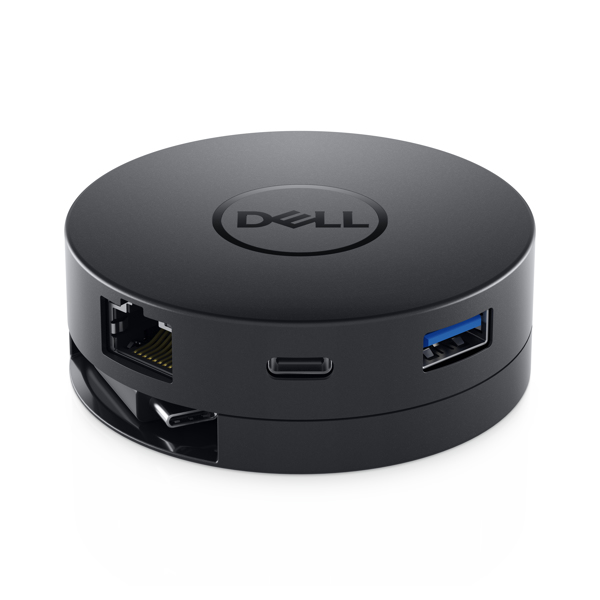
DA300 W125781982 USB 3.2 Gen 2 Type-C Wired Adapter
USB-C Mobile Adapter - HDMI/ VGA/ DisplayPort/ RJ-45 - 80 g - Black
Brand: Dell
SKU: W0YFT
$203.88
Price as listed. Shipping charges calculated at checkout.
In stock

Do you have any question about this product or its specs? Want to know more? Click here to contact our pre-sales consultant and make the right purchase.
 NOTE: The information below is provided for your convenience only; the accuracy of the specifications cannot be guaranteed. However, if necessary, please check with us before purchasing. Data provided by 1 World Sync.
General
Connectivity technology
Wired
Host interface
USB 3.2 Gen 2 (3.1 Gen 2) Type-C
Ethernet LAN
Y
Ethernet LAN data rates
10,100,1000 Mbit/s
Product colour
Black
Maximum digital resolution
3840 x 2160 pixels
Brand compatibility
Dell
Power source type
USB
Windows operating systems supported
Windows 10,Windows 7,Windows 8,Windows 8.1
Mobile operating systems supported
Android
DELL DA300. Connectivity technology: Wired, Host interface: USB 3.2 Gen 2 (3.1 Gen 2) Type-C. Ethernet LAN data rates: 10,100,1000 Mbit/s. Product colour: Black, Maximum digital resolution: 3840 x 2160 pixels, Brand compatibility: Dell. Power source type: USB. Windows operating systems supported: Windows 10,Windows 7,Windows 8,Windows 8.1, Mobile operating systems supported: Android
https://www.dell.com/en-us/shop/dell-usb-c-mobile-adapter-da300/apd/470-acwn/pc-accessories
Featuring the widest variety of port options available, the Dell USB-C Mobile Adapter - DA300 offers seamless video, network, and data connectivity, in a compact design.\n\nMost comprehensive, compact 6-in-1 USB-C adapter\n\nFeaturing the widest variety of port options available including HDMI, DP, VGA, Ethernet, USB-C and USB-A, the Dell USB-C Mobile Adapter - DA300 offers seamless videoi, network, and data connectivity, in a neat, compact design.\n\nCrisp 4K resolution at 60Hz and fast SuperSpeed USB 10 Gbps data transfer rate\n\nConnect to high resolution displays without compromising on performance, thanks to the USB-C Mobile AdapterΓÇÖs ability to support 4K resolution at 60Hz. Simply plug in your PC to a monitor or projector via DisplayPort or HDMI 2.0. Using legacy video ports is also a breeze with the adapterΓÇÖs readily available VGA port. \nThe USB-C and USB-A downstream ports let you connect other supported peripherals and enjoy faster file transfers with SuperSpeed USB 10Gbps data transfer speeds.\n\nInnovative design\n\nThe small, round-shaped adapter fits neatly in your bag, while the concealed cable can be extended or retracted by rotating the top and bottom cover of the adapter, for easy storage. The longer coaxial cable offers flexibility to connect to various form factors from clamshells to 2-in-1s to detachables, providing enhanced signal quality for stable connectivity wherever your busy day takes you.\n\nEasy plug and play. Best with Dell systems\n\nEasy to use, the adapter is ready to go when you plug it in - no installation of external drivers is necessary. Pair your adapter with Dell systems to enjoy Business Class features such as MAC address pass-through, PXE Boot, and Wake-On-LAN. It works with most operating systems, including Windows and MAC.\n\nAdditional Product Notes\n\n1. Only one video output is supported at a time.\n2. Available with select PC models (with support for DisplayPort Alt-Mode 1.3 & above standard) when connected to displays that offer 4K resolution at 60Hz. Otherwise, default\nresolution will be 4K at 30Hz.\n3. a) When adapter is connected to a Thunderbolt or 15W USB-C (DisplayPort Alt-mode) port ΓÇô two downstream USB-C and USB-A ports with USB3.1 Gen 2 file transfer rate of up\nto 10 Gbps is supported.\nb) When adapter is connected to a 7.5W USB-C (DisplayPort Alt-mode) port ΓÇô only one of the two downstream USB-C and USB-A ports with USB2.0. file transfer rate up to 480\nMbps is supported on a 1st come 1st serve basis (the peripheral connected first to either the USB-C or USB-A port is supported)\n4. USB mice, keyboards, mice dongles, select SSDs and flash drives.\n5. Dell Business Class Features include:\nPXE Boot ΓÇô Pre eXecution Environment Boot allows a computer to be troubleshot remotely when connected to the network via its network card. Wake-On-LAN ΓÇô Starts your PC\nremotely using the signal over your network.\nMAC address pass-through ΓÇô MAC address pass through recognizes only a unique MAC address entered in the systemΓÇÖs BIOS (Basic Input/Output System) by overriding the\nadapter MAC address every time your laptop is connected to the network, ensuring that your PCΓÇÖs MAC address stays the same no matter which USB-C adapter you use.\n6. Tested with macOS High Sierra 10.13.4 and macOS Sierra 10.12.6.
Featuring the widest variety of port options available, the Dell USB-C Mobile Adapter - DA300 offers seamless video, network, and data connectivity, in a compact design.\n\nMost comprehensive, compact 6-in-1 USB-C adapter\n\nFeaturing the widest variety of port options available including HDMI, DP, VGA, Ethernet, USB-C and USB-A, the Dell USB-C Mobile Adapter - DA300 offers seamless videoi, network, and data connectivity, in a neat, compact design.\n\nCrisp 4K resolution at 60Hz and fast SuperSpeed USB 10 Gbps data transfer rate\n\nConnect to high resolution displays without compromising on performance, thanks to the USB-C Mobile AdapterΓÇÖs ability to support 4K resolution at 60Hz. Simply plug in your PC to a monitor or projector via DisplayPort or HDMI 2.0. Using legacy video ports is also a breeze with the adapterΓÇÖs readily available VGA port. \nThe USB-C and USB-A downstream ports let you connect other supported peripherals and enjoy faster file transfers with SuperSpeed USB 10Gbps data transfer speeds.\n\nInnovative design\n\nThe small, round-shaped adapter fits neatly in your bag, while the concealed cable can be extended or retracted by rotating the top and bottom cover of the adapter, for easy storage. The longer coaxial cable offers flexibility to connect to various form factors from clamshells to 2-in-1s to detachables, providing enhanced signal quality for stable connectivity wherever your busy day takes you.\n\nEasy plug and play. Best with Dell systems\n\nEasy to use, the adapter is ready to go when you plug it in - no installation of external drivers is necessary. Pair your adapter with Dell systems to enjoy Business Class features such as MAC address pass-through, PXE Boot, and Wake-On-LAN. It works with most operating systems, including Windows and MAC.\n\nAdditional Product Notes\n\n1. Only one video output is supported at a time.\n2. Available with select PC models (with support for DisplayPort Alt-Mode 1.3 & above standard) when connected to displays that offer 4K resolution at 60Hz. Otherwise, default\nresolution will be 4K at 30Hz.\n3. a) When adapter is connected to a Thunderbolt or 15W USB-C (DisplayPort Alt-mode) port ΓÇô two downstream USB-C and USB-A ports with USB3.1 Gen 2 file transfer rate of up\nto 10 Gbps is supported.\nb) When adapter is connected to a 7.5W USB-C (DisplayPort Alt-mode) port ΓÇô only one of the two downstream USB-C and USB-A ports with USB2.0. file transfer rate up to 480\nMbps is supported on a 1st come 1st serve basis (the peripheral connected first to either the USB-C or USB-A port is supported)\n4. USB mice, keyboards, mice dongles, select SSDs and flash drives.\n5. Dell Business Class Features include:\nPXE Boot ΓÇô Pre eXecution Environment Boot allows a computer to be troubleshot remotely when connected to the network via its network card. Wake-On-LAN ΓÇô Starts your PC\nremotely using the signal over your network.\nMAC address pass-through ΓÇô MAC address pass through recognizes only a unique MAC address entered in the systemΓÇÖs BIOS (Basic Input/Output System) by overriding the\nadapter MAC address every time your laptop is connected to the network, ensuring that your PCΓÇÖs MAC address stays the same no matter which USB-C adapter you use.\n6. Tested with macOS High Sierra 10.13.4 and macOS Sierra 10.12.6.
0.0
0 review(s)
Inside NetworkDistri
From our network to yours.
Every day, technology moves through our operation — received, checked, prepared and dispatched to customers. The images below show real equipment handled through our operation, not stock photography.
Real operations
Technology we actually handle
01
Source
Global supply
02
Receive
Goods arrive
03
Prepare
Process & pack
04
Dispatch
On the way





































