

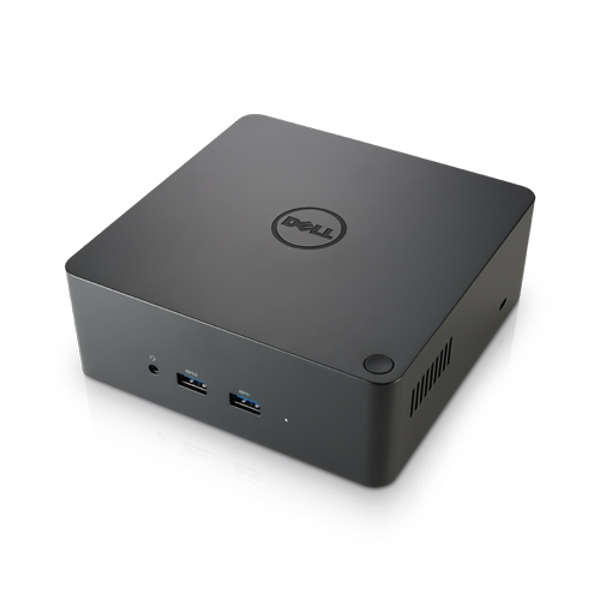
Business Thunderbolt Dock (GP17G)
Port replicator
Brand: Dell
SKU: GP17G
$407.88
Price as listed. Shipping charges calculated at checkout.
In stock

Do you have any question about this product or its specs? Want to know more? Click here to contact our pre-sales consultant and make the right purchase.
 NOTE: The information below is provided for your convenience only; the accuracy of the specifications cannot be guaranteed. However, if necessary, please check with us before purchasing. Data provided by 1 World Sync.
|
|
|||||||||||||||||||||||||||||||||||||||||||||||||||||||||||||||||||||||||||||||||||||||||||||||||
|
|||||||||||||||||||||||||||||||||||||||||||||||||||||||||||||||||||||||||||||||||||||||||||||||||

Business Thunderbolt Dock
https://accessories.euro.dell.com/sna/PopupProductDetail.aspx?cs=ukbsdt1&l=en&c=uk&sku=452-BCOY
One dock. One cable. Ultimate Performance.
The Dell Thunderbolt™ Dock TB16 -180W with Intel® Thunderbolt 3 technology is the ultimate docking solution, designed for power users and traditional workstation clients, creating the ability to connect up to three FHD displays, two 4K displays, or one 5K display at 60Hz. Data transfers up to 40 Gbps allow lightning-fast transfers of larger files such as video editing files.
Small footprint and big flexibility
The Dell ThunderboltΓäó Dock TB16 -180W is small in sizeΓÇöjust 5.7 x 5.7 x 2 inches (145 x 145 x 51mm). By connecting one cable to your laptop, you can get access to a wide variety of ports, enhancing productivity.
One source for power
The Dell ThunderboltΓäó Dock TB16 -180W can provide power to your laptop (at 19.5V) and can also provide power to attached ThunderboltΓäó 3 peripherals. With the ability to provide up to 60W of power to an external ThunderboltΓäó 3 device, this version is best for Dell Latitude and XPS notebooks and 2-in-1s with a ThunderboltΓäó 3 port that require up to 65W of power.
Connections and Features:
- Supports 3 displays
- Two USB 2.0 ports;
- Three USB 3.0 ports;
- Thunderbolt 3 (USB-C) port;
- Speaker output (rear);
- Combo audio (front);
- Gigabit Ethernet;
- Kensington Lock Slot;
- 7.4 mm DC-IN Power Input.
Overview
The Dell ThunderboltΓäó Dock TB16 -180W allows you to quickly connect your mobile workstation to a single data and power source for ultimate display performance and speedy data transfers. The dock connects to ThunderboltΓäó 3 enabled notebooks* with a single USB Type-C ThunderboltΓäó Cable, allowing users to quickly connect to multiple displays and peripherals, providing power to the notebook, and freeing up space on your desk and in your workspace.
One dock. One cable. Ultimate Performance.
The Dell Thunderbolt™ Dock TB16 -180W with Intel® Thunderbolt 3 technology is the ultimate docking solution, designed for power users and traditional workstation clients, creating the ability to connect up to three FHD displays, two 4K displays, or one 5K display at 60Hz. Data transfers up to 40 Gbps allow lightning-fast transfers of larger files such as video editing files.
Small footprint and big flexibility
The Dell ThunderboltΓäó Dock TB16 -180W is small in sizeΓÇöjust 5.7 x 5.7 x 2 inches (145 x 145 x 51mm). By connecting one cable to your laptop, you can get access to a wide variety of ports, enhancing productivity.
One source for power
The Dell ThunderboltΓäó Dock TB16 -180W can provide power to your laptop (at 19.5V) and can also provide power to attached ThunderboltΓäó 3 peripherals. With the ability to provide up to 60W of power to an external ThunderboltΓäó 3 device, this version is best for Dell Latitude and XPS notebooks and 2-in-1s with a ThunderboltΓäó 3 port that require up to 65W of power.
Connections and Features:
- Supports 3 displays
- Two USB 2.0 ports;
- Three USB 3.0 ports;
- Thunderbolt 3 (USB-C) port;
- Speaker output (rear);
- Combo audio (front);
- Gigabit Ethernet;
- Kensington Lock Slot;
- 7.4 mm DC-IN Power Input.
Overview
The Dell ThunderboltΓäó Dock TB16 -180W allows you to quickly connect your mobile workstation to a single data and power source for ultimate display performance and speedy data transfers. The dock connects to ThunderboltΓäó 3 enabled notebooks* with a single USB Type-C ThunderboltΓäó Cable, allowing users to quickly connect to multiple displays and peripherals, providing power to the notebook, and freeing up space on your desk and in your workspace.
0.0
0 review(s)
Inside NetworkDistri
From our network to yours.
Every day, technology moves through our operation — received, checked, prepared and dispatched to customers. The images below show real equipment handled through our operation, not stock photography.
Real operations
Technology we actually handle
01
Source
Global supply
02
Receive
Goods arrive
03
Prepare
Process & pack
04
Dispatch
On the way





































