

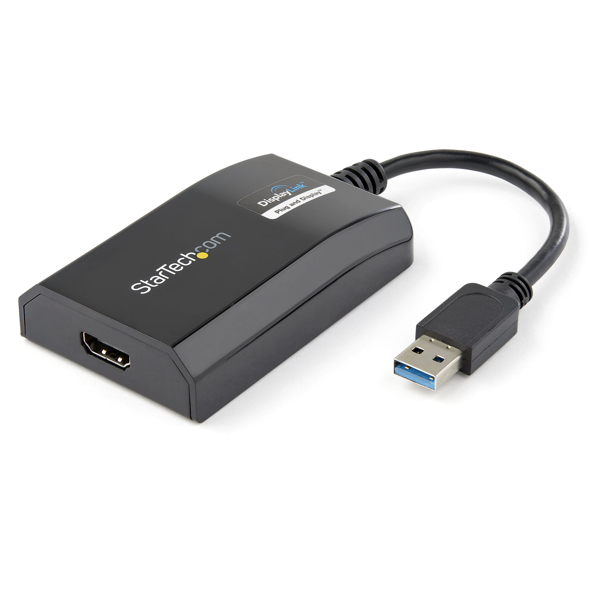
StarTech USB 3.0 to HDMI Adapter 1080p External
(USB32HDPRO)
Brand: StarTech.com
SKU: USB32HDPRO
$143.88
Price as listed. Shipping charges calculated at checkout.
In stock

Do you have any question about this product or its specs? Want to know more? Click here to contact our pre-sales consultant and make the right purchase.
 NOTE: The information below is provided for your convenience only; the accuracy of the specifications cannot be guaranteed. However, if necessary, please check with us before purchasing. Data provided by 1 World Sync.
General
USB version
3.2 Gen 1 (3.1 Gen 1)
USB connector type
USB Type-A
USB connector gender
Male
Product colour
Black
Housing material
Plastic
USB cable length
0.9 m
Windows operating systems supported
Windows 10,Windows 10 Education,Windows 10 Education x64,Windows 10 Enterprise,Windows 10 Enterprise x64,Windows 10 Home,Windows 10 Home x64,Windows 10 IOT Core,Windows 10 Pro,Windows 10 Pro x64,Windows 7,Windows 7 Enterprise,Windows 7 Enterprise x64,Windows 7 Home Basic,Windows 7 Home Basic x64,Windows 7 Home Premium,Windows 7 Home Premium x64,Windows 7 Professional,Windows 7 Professional x64,Windows 7 Starter,Windows 7 Starter x64,Windows 7 Ultimate,Windows 7 Ultimate x64,Windows 8,Windows 8 Enterprise,Windows 8 Enterprise x64,Windows 8 Pro,Windows 8 Pro x64,Windows 8 x64,Windows 8.1,Windows 8.1 Enterprise,Windows 8.1 Enterprise x64,Windows 8.1 Pro,Windows 8.1 Pro x64,Windows 8.1 x64,Windows Vista,Windows Vista Business,Windows Vista Business x64,Windows Vista Enterprise,Windows Vista Enterprise x64,Windows Vista Home Basic,Windows Vista Home Basic x64,Windows Vista Home Premium,Windows Vista Home Premium x64,Windows Vista Ultimate,Windows Vista Ultimate x64,Windows Vista x64,Windows XP,Windows XP Home,Windows XP Home x64,Windows XP Professional,Windows XP Professional x64
Mac operating systems supported
Mac OS X 10.10 Yosemite,Mac OS X 10.11 El Capitan,Mac OS X 10.12 Sierra,Mac OS X 10.14 Mojave,Mac OS X 10.15 Catalina,Mac OS X 10.15.3 Catalina,Mac OS X 10.6 Snow Leopard,Mac OS X 10.7 Lion,Mac OS X 10.8 Mountain Lion,Mac OS X 10.9 Mavericks,Mac OS X 11.0 Big Sur
Linux operating systems supported
Ubuntu 14.04,Ubuntu 16.04,Ubuntu 18.04 LTS
Width
55 mm
Depth
90 mm
Height
20 mm
Quantity per master (outer) case
40 pc(s)
Master (outer) case width
42.7 cm
Master (outer) case length
44.2 cm
StarTech.com USB 3.0 to HDMI Adapter - DisplayLink Certified - 1080p (1920x1200) - USB Type-A to HDMI Display Adapter Converter for Monitor - External Video & Graphics Card - Windows/Mac. USB version: 3.2 Gen 1 (3.1 Gen 1), USB connector type: USB Type-A, USB connector gender: Male. Product color: Black, Housing material: Plastic, USB cable length: 0.9 m. Windows operating systems supported: Windows 10,Windows 10 Education,Windows 10 Education x64,Windows 10 Enterprise,Windows 10..., Mac operating systems supported: Mac OS X 10.10 Yosemite,Mac OS X 10.11 El Capitan,Mac OS X 10.12 Sierra,Mac OS 10.14 Mojave,Mac..., Linux operating systems supported: Ubuntu 14.04,Ubuntu 16.04,Ubuntu 18.04 LTS. Width: 55mm, Depth: 90mm, Height: 20mm. Quantity per master (outer) case: 40 pc(s), Master (outer) case width: 42.7 cm, Master (outer) case length: 44.2 cm
| Estimate Gross Weight | 0.196 |
|---|
https://www.startech.com/en-us/USB32HDPRO
USB 3.0 External Video & Graphics Card | Multi-Monitor | USB-Powered | Supports Mac & Windows®The USB32HDPRO USB 3.0 to HDMI Adapter lets you add an HDMI display to your computer through a USB 3.0 port, providing a cost-effective and convenient way to expand the video capabilities of your Mac® or PC computer system.USB 3.0 Bandwidth, High Definition PerformanceWith USB 3.0 support, this external video adapter delivers the bandwidth needed for accelerated High-Definition video performance, capable of outputting video resolutions up to 1920x1200 / 1080p. Even if your current computer doesn’t have a USB 3.0 port available, the USB32HDPRO is backward compatible with USB 2.0, so you’ll be able to connect your HDMI monitor to your computer and be ready for when you upgrade to a USB 3.0-equipped system.Easier Multitasking, More ProductivityAdd the screen space you need to simplify multitasking and maximize productivity, without even opening your computer case. Some computer systems, including MacBook® and Ultrabook™ laptops and small form-factor desktops, are too compact to install an internal video card. A USB display adapter offers an easy workaround, performing as an external video card that only requires an available USB port to mirror or extend your desktop onto another display.DisplayLink Plug-and-Display CertifiedInstallation has never been easier. When you connect this DisplayLink Plug and Display certified adapter to a web-enabled Windows® 10, Windows® 8 or Windows® 7 computer, it automatically downloads and installs the most up-to-date drivers for you, so you won’t have to manually download or install any software.The USB32HDPRO is backed by a StarTech.com 2-year warranty and free lifetime technical support.Recommended System Requirements:CPU: Quad Core 2.4GHz or Higher (i5 recommended)RAM: 4GB or higher
USB 3.0 External Video & Graphics Card | Multi-Monitor | USB-Powered | Supports Mac & Windows®The USB32HDPRO USB 3.0 to HDMI Adapter lets you add an HDMI display to your computer through a USB 3.0 port, providing a cost-effective and convenient way to expand the video capabilities of your Mac® or PC computer system.USB 3.0 Bandwidth, High Definition PerformanceWith USB 3.0 support, this external video adapter delivers the bandwidth needed for accelerated High-Definition video performance, capable of outputting video resolutions up to 1920x1200 / 1080p. Even if your current computer doesn’t have a USB 3.0 port available, the USB32HDPRO is backward compatible with USB 2.0, so you’ll be able to connect your HDMI monitor to your computer and be ready for when you upgrade to a USB 3.0-equipped system.Easier Multitasking, More ProductivityAdd the screen space you need to simplify multitasking and maximize productivity, without even opening your computer case. Some computer systems, including MacBook® and Ultrabook™ laptops and small form-factor desktops, are too compact to install an internal video card. A USB display adapter offers an easy workaround, performing as an external video card that only requires an available USB port to mirror or extend your desktop onto another display.DisplayLink Plug-and-Display CertifiedInstallation has never been easier. When you connect this DisplayLink Plug and Display certified adapter to a web-enabled Windows® 10, Windows® 8 or Windows® 7 computer, it automatically downloads and installs the most up-to-date drivers for you, so you won’t have to manually download or install any software.The USB32HDPRO is backed by a StarTech.com 2-year warranty and free lifetime technical support.Recommended System Requirements:CPU: Quad Core 2.4GHz or Higher (i5 recommended)RAM: 4GB or higher
- "PERFORMANCE: USB 3.0 to HDMI adapter lets you connect your laptop or desktop computer to an HDMI monitor or projector using a single USB Type-A port / 1920x1200 (1080p) / 5.1ch audio (through HDMI) / HDCP 1.4 / 6.3in (16cm) cable length
- INCREASE PRODUCTIVITY: USB-A to HDMI adapter lets you add a display in extended mode (2 displays total incl. laptop screen) / Add multiple HDMI screens w/ additional available USB-A ports / USB bus-powered w/ no extra power supply required; Compact design
- COMPATIBILITY: USB to HDMI adapter dongle is DisplayLink certified / Ensured compatibility with any USB-A laptop, Ultrabook, PC desktop or small form factor system / Adapter works with USB 3.1 and 3.0 devices
- EASY SETUP: This USB to HDMI converter is compatible w/ Windows, macOS, ChromeOS and Ubuntu operating systems; Auto-driver install with Windows & Chrome/ External USB 3.0 (USB 3.1 Gen 1) Video Graphics Card Adapter for dual/multiple monitor workspace
- STARTECH.COM ADVANTAGE: IT professionals choice for over 30 years; This USB Type-A to HDMI adapter dongle is backed for 2-years by StarTech.com, including free 24/5 North America based multi-lingual tech support"
0.0
0 review(s)
Inside NetworkDistri
From our network to yours.
Every day, technology moves through our operation — received, checked, prepared and dispatched to customers. The images below show real equipment handled through our operation, not stock photography.
Real operations
Technology we actually handle
01
Source
Global supply
02
Receive
Goods arrive
03
Prepare
Process & pack
04
Dispatch
On the way





































