

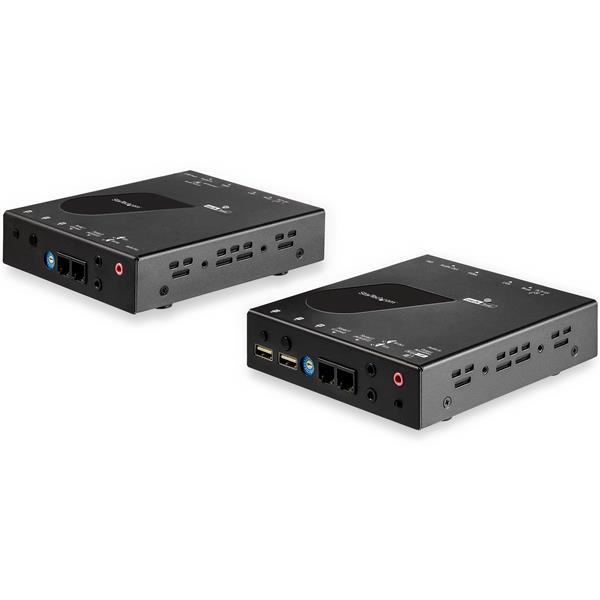
StarTech SV565HDIP 4K HDMI Extender KVM over CAT6
(SV565HDIP)
Brand: StarTech.com
SKU: SV565HDIP
$827.88
Price as listed. Shipping charges calculated at checkout.
In stock

Do you have any question about this product or its specs? Want to know more? Click here to contact our pre-sales consultant and make the right purchase.
 NOTE: The information below is provided for your convenience only; the accuracy of the specifications cannot be guaranteed. However, if necessary, please check with us before purchasing. Data provided by 1 World Sync.
General
Keyboard port type
USB
Mouse port type
USB
Video port type
HDMI
HD type
4K Ultra HD
Maximum resolution
3840 x 2160 pixels
Video bandwidth
30 Hz
Product colour
Black
Housing material
Steel
Mean time between failures (MTBF)
60000 h
AC input voltage
100 - 240 V
Input current
0.6 A
Output voltage
12 V
Width
117 mm
Depth
130 mm
Height
28 mm
StarTech.com HDMI KVM Extender over IP Network - 4K 30Hz HDMI 2.0 and USB over IP LAN or Cat5e/Cat6 Ethernet Cable (100m/330ft) - Remote KVM Switch/Console Transmitter/Receiver Extender Kit. Keyboard port type: USB, Mouse port type: USB, Video port type: HDMI. HD type: 4K Ultra HD, Maximum resolution: 3840 x 2160 pixels, Video bandwidth: 30 Hz. Product colour: Black, Housing material: Steel, Mean time between failures (MTBF): 60000 h. AC input voltage: 100 - 240 V, Input current: 0.6 A, Output voltage: 12 V. Width: 117 mm, Depth: 130 mm, Height: 28 mm
| Estimate Gross Weight | 0.075 |
|---|
https://www.startech.com/en-us/SV565HDIP
KVM Console Extender Over IP | HDMI® | 4K @ 30Hz | 4x USB Ports | EDID Pass-ThroughThis HDMI KVM extender kit lets you use a keyboard, mouse and monitor to remotely control any computer over your IP-enabled local area network (LAN). Combined with a KVM switch, the KVM console extender can be used with multiple computers. The extender features four USB ports that enable you to connect other USB devices, in addition to your keyboard and mouse.Supports UHD 4K 30HzThe HDMI KVM extender delivers astonishing 4K UHD picture quality to your remote display with support for resolutions up to 3840 x 2160p at 30Hz.Hassle-Free InstallationWith a transmitter and a receiver, the KVM extender provides a complete end-to-end solution that supports mounting for tidy installation. Plus, it uses standard CAT5e or CAT6 Ethernet cable, eliminating the expense and hassle of specialized cables and enabling you to use existing network infrastructure.The extender supports EDID pass-through, ensuring your computer can automatically configure optimal settings for your display over your LAN.Versatile Configuration OptionsThe extender uses your local intranet to connect your computers to your remote workstation. You can connect additional receivers (sold separately) to distribute your HDMI signal to multiple displays in your remote location, or combine the source to create a video wall that expands your single video source across multiple displays.For smaller-scale applications, you can connect the transmitter and receiver units directly over CAT5 or CAT6 cabling up to 330 feet (100 meters).SV565HDIP is backed by a 2-year warranty and free lifetime technical support.The StarTech.com Advantage
KVM Console Extender Over IP | HDMI® | 4K @ 30Hz | 4x USB Ports | EDID Pass-ThroughThis HDMI KVM extender kit lets you use a keyboard, mouse and monitor to remotely control any computer over your IP-enabled local area network (LAN). Combined with a KVM switch, the KVM console extender can be used with multiple computers. The extender features four USB ports that enable you to connect other USB devices, in addition to your keyboard and mouse.Supports UHD 4K 30HzThe HDMI KVM extender delivers astonishing 4K UHD picture quality to your remote display with support for resolutions up to 3840 x 2160p at 30Hz.Hassle-Free InstallationWith a transmitter and a receiver, the KVM extender provides a complete end-to-end solution that supports mounting for tidy installation. Plus, it uses standard CAT5e or CAT6 Ethernet cable, eliminating the expense and hassle of specialized cables and enabling you to use existing network infrastructure.The extender supports EDID pass-through, ensuring your computer can automatically configure optimal settings for your display over your LAN.Versatile Configuration OptionsThe extender uses your local intranet to connect your computers to your remote workstation. You can connect additional receivers (sold separately) to distribute your HDMI signal to multiple displays in your remote location, or combine the source to create a video wall that expands your single video source across multiple displays.For smaller-scale applications, you can connect the transmitter and receiver units directly over CAT5 or CAT6 cabling up to 330 feet (100 meters).SV565HDIP is backed by a 2-year warranty and free lifetime technical support.The StarTech.com Advantage
- REMOTE ACCESS: HDMI KVM extender over IP controls a KVM Switch/Console or PC from up to 328ft (100 m) away over Cat5e/6 Ethernet cable or over IP-enabled local area network (LAN) for unlimited range
- 4K VIDEO QUALITY: HDMI transmitter & extender kit achieves ultra HD resolutions up to 3840 x 2160 4K at 30Hz supports large video signage display at remote locations; Mounting hardware incl.
- HDMI / 4K 30Hz 3840 x 2160 / USB 2.0 HID / OS Independent / 2 x 3.5mm Analog Audio + Mic / Digital 7.1 Surround Audio / EDID Passthrough / IP Routable/Switchable / 100m Max Direct Connection / 2yr War
- ADVANCED AUDIO & VIDEO: EDID passthrough transfers display capabilities to the video source, maximizing compatibility between devices; Digital 7.1 surround audio over HDMI offers theatre-grade sound
- VIDEO WALL SUPPORT: Connect receivers (sold separately) to distribute HDMI signal to multiple displays at remote location or combine source to create a 9x9 video wall; Configure using an intuitive GUI
0.0
0 review(s)
Inside NetworkDistri
From our network to yours.
Every day, technology moves through our operation — received, checked, prepared and dispatched to customers. The images below show real equipment handled through our operation, not stock photography.
Real operations
Technology we actually handle
01
Source
Global supply
02
Receive
Goods arrive
03
Prepare
Process & pack
04
Dispatch
On the way





































