

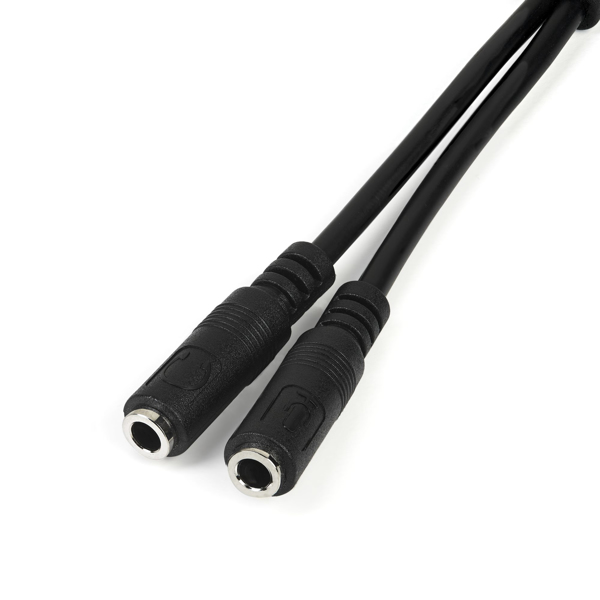
StarTech Audio Headset Splitter
and Headphone Splitter - 3.5mm Male Aux to 3.5mm Female Audio & Mic Combo Jack Y Cable for Laptop / PC (MUYHSMFF)
Brand: StarTech.com
SKU: MUYHSMFF
$59.88
Price as listed. Shipping charges calculated at checkout.
In stock

Do you have any question about this product or its specs? Want to know more? Click here to contact our pre-sales consultant and make the right purchase.
 NOTE: The information below is provided for your convenience only; the accuracy of the specifications cannot be guaranteed. However, if necessary, please check with us before purchasing. Data provided by 1 World Sync.
General
Product colour
Black
Connector 1
3.5 mm
Connector 2
2 x 3.5 mm
Cable length
0.2 m
Weight
12 g
Package width
9 mm
StarTech.com Headset adapter for headsets with separate headphone / microphone plugs - 3.5mm 4 position to 2x 3 position 3.5mm M/F. Product colour: Black, Connector 1: 3.5 mm, Connector 2: 2 x 3.5 mm. Cable length: 0.2 m, Weight: 12 g, Package width: 9 mm
| Estimate Gross Weight | 0.014 |
|---|
https://www.startech.com/Cables/Audio-Video/Audio-Cables/35mm-4-Position-to-2x-3-Position-35mm-Headset-Adapter-Male-to-Female~MUYHSMFF
Have you recently purchased a newer laptop or Ultrabook and now you canΓÇÖt figure out where to plug in your favorite headset?
Most new laptops and Ultrabooks come equipped with a single 3.5mm 4-position (4pin) audio port that supports both audio input and output. A great number of headsets on the market come equipped with two separate headphone and microphone connectors that are not compatible with this new configuration.
The MUYHSMFF headset adapter features two 3.5mm 3-position ports that provide a separate headphone and microphone connection that can be connected to the single audio port on your laptop. Alternatively, you can also connect a separate microphone and powered speakers if you prefer to use Skype or chat online without using a headset.
Headset Connectivity
Simply connect the headphone plug from your headset into the audio output port marked with the headphone symbol, and connect the microphone plug into the audio input port marked with the microphone symbol. Plug the adapter into audio port on your laptop and youΓÇÖre all set.
Microphone and Powered Speaker Connectivity
Want to work or game without using a headset?
You can also connect a microphone and powered speakers to your laptop using the adapter. Just plug in your microphone into the audio input port marked with the microphone symbol, and plug your powered speakers into the audio output port marked with the headphone symbol, and connect the adapter to the audio port on your laptop.
Keep in touch while you travel
Are you travelling for work or taking a trip?
The headset adapter features a compact and sturdy design that makes it the perfect solution for mobile applications.
Tuck the adapter in with your tablet or slip it inside another carrying case. It works great with tablets and smartphones that have a single audio port. Just connect the headphone and microphone plugs from your headset into the adapter, connect the adapter to your mobile device and start talking.
This high quality 3.5mm headset adapter is backed by StarTech.com's lifetime warranty.
Please note:
This adapter is not a headphone splitter or Y-cable. It cannot be used to split the audio output to two separate sets of headphones or speakers.
Some laptops and mobile devices will not work with all external microphones. This is typically caused by an impedance mismatch between the microphone and the device. This is due to hardware incompatibility and is not a limitation of the MUYHSMFF adapter.
The StarTech.com Advantage
- Turns a 3.5mm combo headphone/microphone port into two distinct ports ΓÇô one 3.5mm headphone jack and one 3.5mm microphone port
- Allows the use of older audio accessories with newer computers
Have you recently purchased a newer laptop or Ultrabook and now you canΓÇÖt figure out where to plug in your favorite headset?
Most new laptops and Ultrabooks come equipped with a single 3.5mm 4-position (4pin) audio port that supports both audio input and output. A great number of headsets on the market come equipped with two separate headphone and microphone connectors that are not compatible with this new configuration.
The MUYHSMFF headset adapter features two 3.5mm 3-position ports that provide a separate headphone and microphone connection that can be connected to the single audio port on your laptop. Alternatively, you can also connect a separate microphone and powered speakers if you prefer to use Skype or chat online without using a headset.
Headset Connectivity
Simply connect the headphone plug from your headset into the audio output port marked with the headphone symbol, and connect the microphone plug into the audio input port marked with the microphone symbol. Plug the adapter into audio port on your laptop and youΓÇÖre all set.
Microphone and Powered Speaker Connectivity
Want to work or game without using a headset?
You can also connect a microphone and powered speakers to your laptop using the adapter. Just plug in your microphone into the audio input port marked with the microphone symbol, and plug your powered speakers into the audio output port marked with the headphone symbol, and connect the adapter to the audio port on your laptop.
Keep in touch while you travel
Are you travelling for work or taking a trip?
The headset adapter features a compact and sturdy design that makes it the perfect solution for mobile applications.
Tuck the adapter in with your tablet or slip it inside another carrying case. It works great with tablets and smartphones that have a single audio port. Just connect the headphone and microphone plugs from your headset into the adapter, connect the adapter to your mobile device and start talking.
This high quality 3.5mm headset adapter is backed by StarTech.com's lifetime warranty.
Please note:
This adapter is not a headphone splitter or Y-cable. It cannot be used to split the audio output to two separate sets of headphones or speakers.
Some laptops and mobile devices will not work with all external microphones. This is typically caused by an impedance mismatch between the microphone and the device. This is due to hardware incompatibility and is not a limitation of the MUYHSMFF adapter.
The StarTech.com Advantage
- Turns a 3.5mm combo headphone/microphone port into two distinct ports ΓÇô one 3.5mm headphone jack and one 3.5mm microphone port
- Allows the use of older audio accessories with newer computers
0.0
0 review(s)
Inside NetworkDistri
From our network to yours.
Every day, technology moves through our operation — received, checked, prepared and dispatched to customers. The images below show real equipment handled through our operation, not stock photography.
Real operations
Technology we actually handle
01
Source
Global supply
02
Receive
Goods arrive
03
Prepare
Process & pack
04
Dispatch
On the way





































