

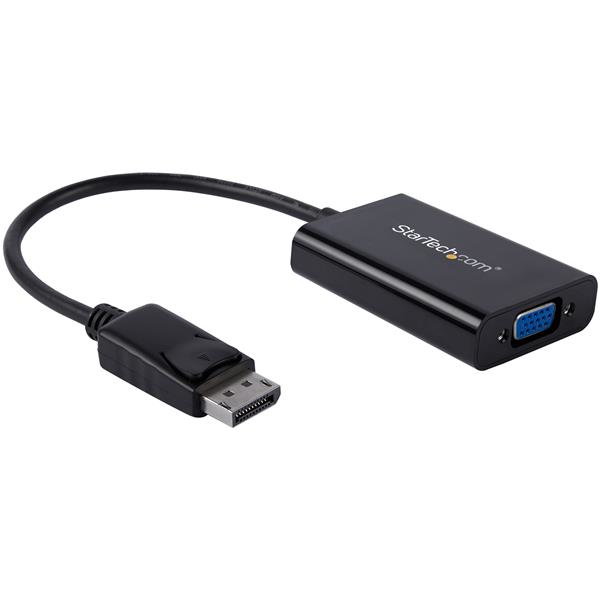
StarTech DisplayPort VGA Adapter
DP to VGA Converter for Your VGA Monitor or Display (DP2VGAA)
Brand: StarTech.com
SKU: DP2VGAA
$95.88
Price as listed. Shipping charges calculated at checkout.
In stock

Do you have any question about this product or its specs? Want to know more? Click here to contact our pre-sales consultant and make the right purchase.
 NOTE: The information below is provided for your convenience only; the accuracy of the specifications cannot be guaranteed. However, if necessary, please check with us before purchasing. Data provided by 1 World Sync.
General
Cable length
0.184 m
Maximum resolution
1920 x 1200 pixels
Supported video modes
1080p
Sustainability certificates
RoHS
Weight
50.8 g
Width
42 mm
Depth
67 mm
Package width
200 mm
Package depth
220 mm
Package height
16 mm
StarTech.com DisplayPort to VGA Adapter with Audio. Cable length: 0.184 m, Maximum resolution: 1920 x 1200 pixels, Supported video modes: 1080p. Sustainability certificates: RoHS. Weight: 50.8 g, Width: 42 mm, Depth: 67 mm. Package width: 200 mm, Package depth: 220 mm, Package height: 16 mm
| Estimate Gross Weight | 0.064 |
|---|
https://www.startech.com/product/DP2VGAA
Connect your PC to a VGA display and a discrete 3.5mm audio output
This unique DisplayPort to VGA adapter is equipped with a built-in audio port which lets you connect DisplayPort equipped devices, such as an HP EliteBook Folio 9470m laptop, to a VGA display or projector with audio.
Share your presentations and videos
Because most boardrooms are set up differently, the length of cables available in each room varies. Not all laptops have the DisplayPort (DP) and audio ports positioned on the same side, which can become awkward when youΓÇÖre trying to deliver your presentations. It can also mean that some ports may be just out of reach during a meeting.
This convenient adapter positions your audio and video ports on the same side of your laptop, to ensure that all of the ports you need are accessible when you need them.
Substitute for a damaged audio port
If the audio port on your mobile device is damaged or blocked by other connections, this convenient adapter guarantees that youΓÇÖll always have all of the ports you need for every presentation. By connecting audio to your laptop through the adapter, you can be prepared for any situation.
In order to use the audio function of the adapter you need to power the adapter through a USB port on your laptop, or through a charge port on a USB grommet. Simply plug a Micro USB cable from the adapter into the USB port and audio will be available when you deliver your presentation.
Create a clutter-free environment
The adapter can also be used for connecting your laptop or desktop computer to your monitor and speakers. The adapter and connected cables can be placed nicely at the back of your monitor to create a tidy setup between all of your devices.
Arrive prepared, wherever you go
This DisplayPort to VGA adapter is extremely portable with a lightweight, small-footprint design. ItΓÇÖs the perfect accessory to carry with your mobile devices, fitting easily into your laptop bag or carrying case. Its ultra-portable design makes the adapter ideal for BYOD (Bring Your Own Device) applications at the office.
It also enables you to arrive prepared when youΓÇÖre presenting to a potential client, teaching off-site, or traveling to a meet with a customer.
The DP2VGAA is backed by a 3-year StarTech.com warranty and free lifetime technical support.
The StarTech.com Advantage
- Group your VGA and audio ports together, to ensure theyΓÇÖre all accessible when you need them
- Substitute a damaged or blocked audio port by connecting your audio directly through the adapter
- Provide crystal-clear picture quality with support for high-definition video resolutions up to 1920x1200 or 1080p
Connect your PC to a VGA display and a discrete 3.5mm audio output
This unique DisplayPort to VGA adapter is equipped with a built-in audio port which lets you connect DisplayPort equipped devices, such as an HP EliteBook Folio 9470m laptop, to a VGA display or projector with audio.
Share your presentations and videos
Because most boardrooms are set up differently, the length of cables available in each room varies. Not all laptops have the DisplayPort (DP) and audio ports positioned on the same side, which can become awkward when youΓÇÖre trying to deliver your presentations. It can also mean that some ports may be just out of reach during a meeting.
This convenient adapter positions your audio and video ports on the same side of your laptop, to ensure that all of the ports you need are accessible when you need them.
Substitute for a damaged audio port
If the audio port on your mobile device is damaged or blocked by other connections, this convenient adapter guarantees that youΓÇÖll always have all of the ports you need for every presentation. By connecting audio to your laptop through the adapter, you can be prepared for any situation.
In order to use the audio function of the adapter you need to power the adapter through a USB port on your laptop, or through a charge port on a USB grommet. Simply plug a Micro USB cable from the adapter into the USB port and audio will be available when you deliver your presentation.
Create a clutter-free environment
The adapter can also be used for connecting your laptop or desktop computer to your monitor and speakers. The adapter and connected cables can be placed nicely at the back of your monitor to create a tidy setup between all of your devices.
Arrive prepared, wherever you go
This DisplayPort to VGA adapter is extremely portable with a lightweight, small-footprint design. ItΓÇÖs the perfect accessory to carry with your mobile devices, fitting easily into your laptop bag or carrying case. Its ultra-portable design makes the adapter ideal for BYOD (Bring Your Own Device) applications at the office.
It also enables you to arrive prepared when youΓÇÖre presenting to a potential client, teaching off-site, or traveling to a meet with a customer.
The DP2VGAA is backed by a 3-year StarTech.com warranty and free lifetime technical support.
The StarTech.com Advantage
- Group your VGA and audio ports together, to ensure theyΓÇÖre all accessible when you need them
- Substitute a damaged or blocked audio port by connecting your audio directly through the adapter
- Provide crystal-clear picture quality with support for high-definition video resolutions up to 1920x1200 or 1080p
0.0
0 review(s)
Inside NetworkDistri
From our network to yours.
Every day, technology moves through our operation — received, checked, prepared and dispatched to customers. The images below show real equipment handled through our operation, not stock photography.
Real operations
Technology we actually handle
01
Source
Global supply
02
Receive
Goods arrive
03
Prepare
Process & pack
04
Dispatch
On the way





































