

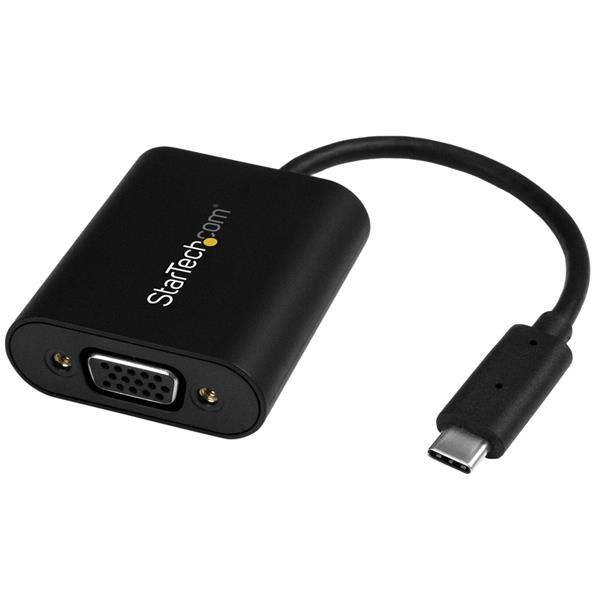
StarTech USB-C to VGA Adapter 1920x1200 Presentation
HDMI Adapter - With Stay Awake - Presentation Mode - USB C Adapter - USB-C to VGA Projector Adapter
Brand: StarTech.com
SKU: CDP2VGASA
$95.88
Price as listed. Shipping charges calculated at checkout.
In stock

Do you have any question about this product or its specs? Want to know more? Click here to contact our pre-sales consultant and make the right purchase.
 NOTE: The information below is provided for your convenience only; the accuracy of the specifications cannot be guaranteed. However, if necessary, please check with us before purchasing. Data provided by 1 World Sync.
General
USB connector type
USB Type-C
Maximum resolution
2048 x 1280 pixels
Refresh rate at maximum resolution
60 Hz
Product colour
Black
USB cable length
0.0950 m
Width
43 mm
Depth
186 mm
Height
15 mm
StarTech.com USB-C to VGA Adapter - with Presentation Mode Switch - 1920x1200. USB connector type: USB Type-C, Maximum resolution: 2048 x 1280 pixels, Refresh rate at maximum resolution: 60 Hz. Product color: Black, USB cable length: 0.095 m. Width: 43 mm, Depth: 186 mm, Height: 15 mm
| Estimate Gross Weight | 0.067 |
|---|
https://www.startech.com/product/CDP2VGASA
Connect your USB-C computer to a VGA display, and prevent your laptop display from going to sleep during a presentation or meeting
This is no ordinary video adapter. Yes, it enables you to connect the USB-C port on your computer to a VGA display or projector, but it also features a unique Presentation Mode switch. When you turn on this switch, the adapter prevents your computer from launching its screen saver, going to sleep or entering power save mode. The adapter ensures that your screen will always stay on, making it the perfect USB-C video adapter for any presentation or meeting.
Keep your audience engaged with your presentation
When you deliver a presentation, your goal is to engage with your audience, not your computer. But, if you don't move your mouse soon enough, or change your power settings, your screen goes black due to inactivity while you're addressing the audience. This can be a major distraction when you're trying to focus on the message you're communicating.
This adapter prevents screen disruptions with Presentation Mode, a unique feature that automatically initiates occasional cursor movement to prevent your computerΓÇÖs power settings from interrupting your presentation. ItΓÇÖs perfect for sharing websites, drawings, spreadsheets, PDFs or slide shows during your meeting.
Turn Presentation Mode on or off
You can turn Presentation Mode on or off, depending on your application. Turn it on when you're in the boardroom and want your screen to stay on, and turn it off when youΓÇÖre using the adapter at your workspace or office desk, to enable your computer's original power settings to take effect. Using the toggle switch is easy, and saves you the hassle of constantly making adjustments in your operating system settings.
Hassle-free setup and operation on Mac and PC
To ensure easy operation and installation, this unique adapter is natively supported on Windows and Mac computers. ItΓÇÖs easy to connect the adapter using the versatile USB Type-C port on your computer. The reversible USB-C connector means you will always plug it in correctly on your first try, saving you the hassle and distraction of repeatedly attempting to connect your laptop to a display or projector.
Crystal-clear picture quality
The adapter supports video resolutions up to 1920x1200 or 1080p. YouΓÇÖll be surprised at the picture quality the adapter provides, even when you connect it to a legacy VGA projector or television. The adapter harnesses the video capabilities that are built into your USB Type-C connection to deliver every detail in stunning high-definition.
The CDP2VGASA is backed by a 3-year StarTech.com warranty and free lifetime technical support.
The StarTech.com Advantage
- Presentation Mode ensures your video output is not interrupted by your computerΓÇÖs power saving modes
- Avoid the hassle of adjusting power settings, with an easy-to-use toggle switch that lets you turn Presentation Mode on or off
- Works on Mac and Windows computers
Connect your USB-C computer to a VGA display, and prevent your laptop display from going to sleep during a presentation or meeting
This is no ordinary video adapter. Yes, it enables you to connect the USB-C port on your computer to a VGA display or projector, but it also features a unique Presentation Mode switch. When you turn on this switch, the adapter prevents your computer from launching its screen saver, going to sleep or entering power save mode. The adapter ensures that your screen will always stay on, making it the perfect USB-C video adapter for any presentation or meeting.
Keep your audience engaged with your presentation
When you deliver a presentation, your goal is to engage with your audience, not your computer. But, if you don't move your mouse soon enough, or change your power settings, your screen goes black due to inactivity while you're addressing the audience. This can be a major distraction when you're trying to focus on the message you're communicating.
This adapter prevents screen disruptions with Presentation Mode, a unique feature that automatically initiates occasional cursor movement to prevent your computerΓÇÖs power settings from interrupting your presentation. ItΓÇÖs perfect for sharing websites, drawings, spreadsheets, PDFs or slide shows during your meeting.
Turn Presentation Mode on or off
You can turn Presentation Mode on or off, depending on your application. Turn it on when you're in the boardroom and want your screen to stay on, and turn it off when youΓÇÖre using the adapter at your workspace or office desk, to enable your computer's original power settings to take effect. Using the toggle switch is easy, and saves you the hassle of constantly making adjustments in your operating system settings.
Hassle-free setup and operation on Mac and PC
To ensure easy operation and installation, this unique adapter is natively supported on Windows and Mac computers. ItΓÇÖs easy to connect the adapter using the versatile USB Type-C port on your computer. The reversible USB-C connector means you will always plug it in correctly on your first try, saving you the hassle and distraction of repeatedly attempting to connect your laptop to a display or projector.
Crystal-clear picture quality
The adapter supports video resolutions up to 1920x1200 or 1080p. YouΓÇÖll be surprised at the picture quality the adapter provides, even when you connect it to a legacy VGA projector or television. The adapter harnesses the video capabilities that are built into your USB Type-C connection to deliver every detail in stunning high-definition.
The CDP2VGASA is backed by a 3-year StarTech.com warranty and free lifetime technical support.
The StarTech.com Advantage
- Presentation Mode ensures your video output is not interrupted by your computerΓÇÖs power saving modes
- Avoid the hassle of adjusting power settings, with an easy-to-use toggle switch that lets you turn Presentation Mode on or off
- Works on Mac and Windows computers
0.0
0 review(s)
Inside NetworkDistri
From our network to yours.
Every day, technology moves through our operation — received, checked, prepared and dispatched to customers. The images below show real equipment handled through our operation, not stock photography.
Real operations
Technology we actually handle
01
Source
Global supply
02
Receive
Goods arrive
03
Prepare
Process & pack
04
Dispatch
On the way





































