

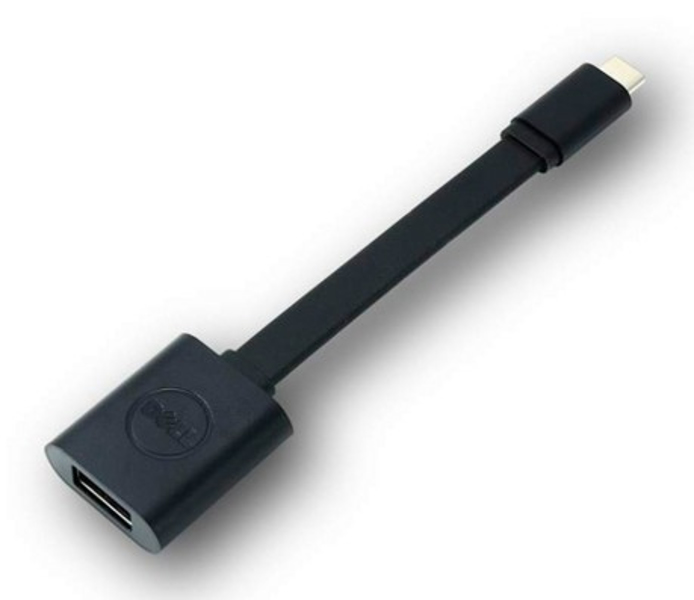
USB-C Male to USB Type A Female 3.1 13.2cm Adapter
USB-C to USB-A 3.0
Brand: Dell
SKU: DBQBJBC054
$95.88
Price as listed. Shipping charges calculated at checkout.
In stock

Do you have any question about this product or its specs? Want to know more? Click here to contact our pre-sales consultant and make the right purchase.
 NOTE: The information below is provided for your convenience only; the accuracy of the specifications cannot be guaranteed. However, if necessary, please check with us before purchasing. Data provided by 1 World Sync.
General
Cable length
0.131 m
Connector 1
USB-C
Connector 2
USB-A 3.0
Product colour
Black
DELL USB-C - USB-A 3.0. Cable length: 0.131 m, Connector 1: USB-C, Connector 2: USB-A 3.0, Product colour: Black
| Estimate Gross Weight | 0.03 |
|---|
https://accessories.euro.dell.com/sna/productdetail.aspx?c=uk&l=en&s=dhs&cs=ukdhs1&sku=470-ABNE
Connect your USB-C computer to USB-A 3.0 devices
With the Dell USB-C to USB-A 3.0 adapter you can connect your computer with USB-C port to standard, newly released, USB-A 3.0 devices and accessories.
Synch your legacy computer with new devices
The Dell Adapter USB-C to USB-A 3.0 is the perfect solution for synching data and charging between your legacy computer and the latest tablets, smartphones and other devices.
Easy to use
Simply plug the USB-C end of the adapter into your computer's USB-C port. Then connect your USB-A 3.0 camera, smartphone, tablet device or other device. Plus, you can also connect a USB cable to charge your smartphone or tablet.
Connections
USB 3.0 Gen 1
USB-C
WhatΓÇÖs in the box
USB-C to USB Adapter
Connect your USB-C computer to USB-A 3.0 devices
With the Dell USB-C to USB-A 3.0 adapter you can connect your computer with USB-C port to standard, newly released, USB-A 3.0 devices and accessories.
Synch your legacy computer with new devices
The Dell Adapter USB-C to USB-A 3.0 is the perfect solution for synching data and charging between your legacy computer and the latest tablets, smartphones and other devices.
Easy to use
Simply plug the USB-C end of the adapter into your computer's USB-C port. Then connect your USB-A 3.0 camera, smartphone, tablet device or other device. Plus, you can also connect a USB cable to charge your smartphone or tablet.
Connections
USB 3.0 Gen 1
USB-C
WhatΓÇÖs in the box
USB-C to USB Adapter
0.0
0 review(s)
Inside NetworkDistri
From our network to yours.
Every day, technology moves through our operation — received, checked, prepared and dispatched to customers. The images below show real equipment handled through our operation, not stock photography.
Real operations
Technology we actually handle
01
Source
Global supply
02
Receive
Goods arrive
03
Prepare
Process & pack
04
Dispatch
On the way





































