

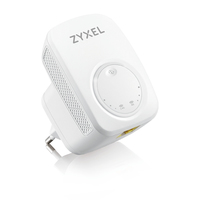
ZYXEL NWD6605 DUAL-BAND WIRELESS AC1200 USB ADAPTER - ROUTER

 NOTE: The information below is provided for your convenience only; the accuracy of the specifications cannot be guaranteed. However, if necessary, please check with us before purchasing. Data provided by 1 World Sync.
General
Type
Network transmitter & receiver
Data transfer rate
433 Mbit/s
Ethernet LAN data rates
10,100 Mbit/s
Cabling technology
10/100Base-T(X)
Wi-Fi
Y
Wi-Fi standards
802.11a,802.11b,802.11g,Wi-Fi 4 (802.11n),Wi-Fi 5 (802.11ac)
Wi-Fi data rate (max)
433 Mbit/s
Product colour
White
Mounting type
Wall
LED indicators
Power, WPS
AC input voltage
100 - 240 V
AC input frequency
50/60 Hz
Width
54.8 mm
Depth
45.2 mm
Height
77.8 mm
Zyxel WRE6505 v2. Type: Network transmitter & receiver, Data transfer rate: 433 Mbit/s, Ethernet LAN data rates: 10,100 Mbit/s. Cabling technology: 10/100Base-T(X), Wi-Fi standards: 802.11a,802.11b,802.11g,Wi-Fi 4 (802.11n),Wi-Fi 5 (802.11ac), Wi-Fi data rate ( max): 433 Mbit/s. Product colour: White, Mounting type: Wall, LED indicators: Power, WPS. AC input voltage: 100 - 240 V, AC input frequency: 50/60 Hz. Width: 54.8 mm, Depth: 45.2 mm, Height: 77.8 mm
| Estimate Gross Weight | 0.274 |
|---|
Compact, stylish and non-intrusive design
The Zyxel WRE6505 v2 Wireless AC750 Range Extender blends into your home environment easily. With dimensions smaller than a teacup, you can plug the device anywhere that fits. Are its lights distracting? Not a problem, ZyxelΓÇÖs WRE6505 v2 gives you that option by simply pressing the WPS button three times!
Easily extends fast 802.11ac Wi-Fi networks to dead spots
Eliminate spots with poor wireless signals in those rooms with the Zyxel WRE6505 v2. Just plug the extender into a wall outlet, press the WPS button on the extender once, and then press the WPS button on your wireless router or gateway, the Zyxel WRE6505 v2 extender will copy your existing Wi-Fi network and extend those wireless signals to those dead spots for all your wireless mobile devices to connect to.
Three selectable extending modes for faster, wider wireless coverage
Extend your Wi-Fi networks with ZyxelΓÇÖs WRE6505 v2 the way you like. You can choose the Normal Mode to extend on both 2.4 GHz and 5 GHz bands, Range Mode that extends only the 2.4 GHz band for better wireless coverage, or Speed Mode to extend only the 5 GHz band for better wireless performance
Signal strength light for the best installation spots
Zyxel WRE6505 v2ΓÇÖs signal strength lights ensure you to get the best wireless coverage throughout your home. Get information on whether youΓÇÖve plugged the extender on the optimal spot to pinpoint the best signal strength on both bands.
Eco-friendly, smart design if you wish to turn off the Light
Lights becoming a distraction? Not a problem, the Zyxel WRE6505 v2 gives you that option by simply pressing the WPS button three times to turn them off.
Sync Wi-Fi settings with Zyxel ONE Connect mobile app
Quickly extend your wireless network if you purchase your WRE6505 v2 range extender with a Zyxel ONE Connect-ready router.
Simply download the Zyxel ONE Connect app and run it to copy the Zyxel ONE Connect-ready router's wireless settings to the Zyxel WRE6505 v2 extender, enabling one wireless network for seamless roaming connections!
Inside NetworkDistri
From our network to yours.
Every day, technology moves through our operation — received, checked, prepared and dispatched to customers. The images below show real equipment handled through our operation, not stock photography.





































