

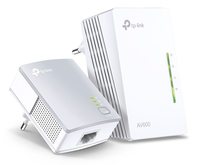
TP-LINK TL-WPA4221 Powerline AV600 - Wireless expansion kit

 NOTE: The information below is provided for your convenience only; the accuracy of the specifications cannot be guaranteed. However, if necessary, please check with us before purchasing. Data provided by 1 World Sync.
General
Maximum data transfer rate
600 Mbit/s
Networking standards
IEEE 1901,IEEE 802.11b,IEEE 802.11g,IEEE 802.11n,IEEE 802.3,IEEE 802.3ab,IEEE 802.3u
Ethernet LAN
Y
Ethernet LAN interface type
Fast Ethernet
Power consumption (typical)
5.2 W
Product colour
White
Antenna type
Internal
LED indicators
LAN, PLC, Power, WLAN
Quantity per pack
1 pc(s)
Cables included
LAN (RJ-45)
Package type
Box
TP-LINK AV600. Maximum data transfer rate: 600 Mbit/s, Networking standards: IEEE 1901,IEEE 802.11b,IEEE 802.11g,IEEE 802.11n,IEEE 802.3,IEEE 802.3ab,IEEE 802.3u, Ethernet LAN interface type: Fast Ethernet. Power consumption (typical): 5.2 W. Product colour: White, Antenna type: Internal, LED indicators: LAN, PLC, Power, WLAN. Quantity per pack: 1 pc(s), Cables included: LAN (RJ-45), Package type: Box
| Estimate Gross Weight | 0.442 |
|---|
Wi-Fi Auto-Sync for Unified Wi-Fi Network
Wi-Fi Auto-Sync creates a simple, intuitive powerline experience. Pressing the Wi-Fi Clone button instantly copies your network name and password from your router for easy setup. Wi-Fi Move automatically applies any settings changes across the network. Your existing Wi-Fi settings will be synchronized to the new extender automatically.
Extend Your Powerline Network to Any Room
Based on the Powerline technology, your network extension is never limited to the primary coverage of your router. With advanced HomePlug AV2, TL-WPA4221 KIT is perfect for providing stable, high-speed data transfer rates of up to 600 Mbps on a line length of up to 300 meters, bring network to anywhere there is a power outlet.
Plug and Play!
Plug the TL-PA4010 in the wall and connect it to the router with an Ethernet cable. Then plug the TL-WPA4220 in any desired power outlet. There you go! Just enjoy the seamless, high speed wired and wireless network.
Press the ΓÇ£PairΓÇ¥ buttons on both adapters to create a more secure network.
Powerline Management on Your Smartphone
The tpPLC Utility and tpPLC app make it easy to control wireless network settings, set schedules for Wi-Fi availability and even control the LED indicators on your adapters from any iOS or Android device. You can download the tpPLC app for iOS and Android devices. You can download the intuitive new tpPLC Utility for your PC at www.tp-link.com/en.
Inside NetworkDistri
From our network to yours.
Every day, technology moves through our operation — received, checked, prepared and dispatched to customers. The images below show real equipment handled through our operation, not stock photography.





































