
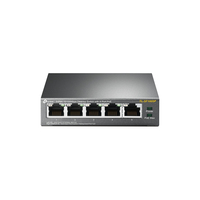
TP-LINK TL-SF1005P 5-Port Desktop Switch
5x 10/100 Mbps RJ-45 - PoE - 1 Gbps - 99.8x98x25 mm
Brand: TP-LINK
SKU: TL-SF1005P
$83.88
Price as listed. Shipping charges calculated at checkout.
In stock

Do you have any question about this product or its specs? Want to know more? Click here to contact our pre-sales consultant and make the right purchase.
 NOTE: The information below is provided for your convenience only; the accuracy of the specifications cannot be guaranteed. However, if necessary, please check with us before purchasing. Data provided by 1 World Sync.
General
Switch type
Unmanaged
Basic switching RJ-45 Ethernet ports type
Fast Ethernet (10/100)
Basic switching RJ-45 Ethernet ports quantity
5
Full duplex
Y
MAC address table
2000 entries
Switching capacity
1 Gbit/s
Networking standards
IEEE 802.3af,IEEE 802.3x
Power over Ethernet (PoE)
Y
TP-LINK TL-SF1005P. Switch type: Unmanaged. Basic switching RJ-45 Ethernet ports type: Fast Ethernet (10/100), Basic switching RJ-45 Ethernet ports quantity: 5. Full duplex. MAC address table: 2000 entries, Switching capacity: 1 Gbit/s. Networking standards: IEEE 802.3af,IEEE 802.3x. Power over Ethernet (PoE)
| Estimate Gross Weight | 0.868 |
|---|
https://www.tp-link.com/us/business-networking/unmanaged-switch/tl-sf1005p/
TL-SF1005P is a 5 10/100Mbps ports unmanaged switch that requires no configuration and provides 4 PoE (Power over Ethernet) ports. It can automatically detect and supply power with all IEEE 802.3af compliant Powered Devices (PDs). In this situation, the electrical power is transmitted along with data in one single cable allowing you to expand your network to where there are no power lines or outlets, where you wish to fix devices such as APs, IP Cameras or IP Phones, etc.
Power over Ethernet
4 of the 5 Auto-Negotiation RJ45 ports (Port 1 to Port 4) of the switch support Power over Ethernet (PoE) function. These PoE ports can automatically detect and supply power with those IEEE 802.3af compliant Powered Devices (PDs).
Overload Arrangement
TL-SF1005P has the priority function which will help protect the system when the system power is overloaded. If all PoE PDs power consumption is >= 58W, a priority will be arranged among the PoE ports, then the system will cut off the power of the lowest-priority port.
Port Priority Function
Priority (port-1=port-2=port-3>port-4): This function will help to ensure the normal operation of the system, it means Port 4 will be cut off when all total PoE PDs power consumption exceed 58W. For an example, Port 1, 2 and 4 is using 15.4W (maximum power for per port is 15.4W); the system power is 46.2W in total. If there is an additional PD inserted to Port 3 with 12W, and then the system will cut off the power of Port 4 because of the overloaded power, this means Port 1, 2 will use 15.4W, and Port3 will use 12W, no power will be supplied to Port 4.
Easy To Use
TL-SF1005P is easy to install and use. It requires no configuration and installation. With desktop design, outstanding performance and quality, the TP-LinkΓÇÖs TL-SF1005P 5-Port 10/100Mbps Desktop Switch with 4-Port PoE is an ideal choice for expanding your home or office network.
- 5 10/100Mbps RJ45 ports
- With four PoE ports, transfers data and power on one single cable
- Working with IEEE 802.3af compliant PDs, expands home and office network
- Supports PoE Power up to 15.4W for each PoE port
- Supports PoE Power up to 58W for all PoE ports
- Requires no configuration and installation
0.0
0 review(s)
Inside NetworkDistri
From our network to yours.
Every day, technology moves through our operation — received, checked, prepared and dispatched to customers. The images below show real equipment handled through our operation, not stock photography.
Real operations
Technology we actually handle
01
Source
Global supply
02
Receive
Goods arrive
03
Prepare
Process & pack
04
Dispatch
On the way