

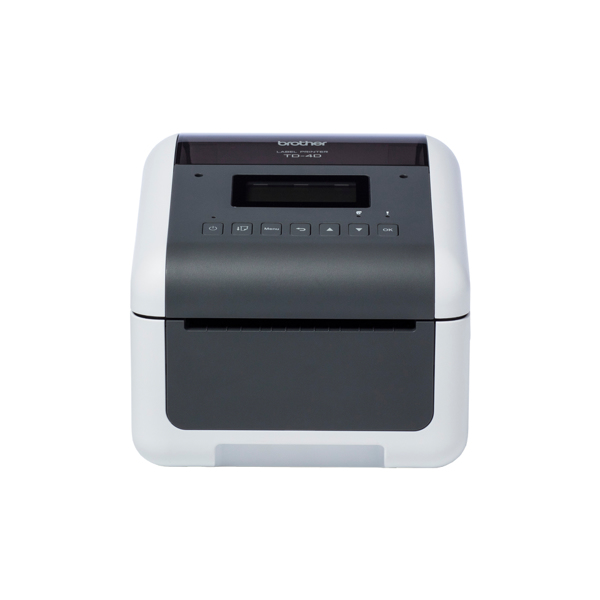
Brother TD-4550DNWB - Label printer
300 dpi - 256 MB - Bluetooth - USB 2.0 - RJ-45 - Ethernet - WLAN
Brand: Brother
SKU: TD4550DNWBXX1
$687.96
Price as listed. Shipping charges calculated at checkout.
In stock

Do you have any question about this product or its specs? Want to know more? Click here to contact our pre-sales consultant and make the right purchase.
 NOTE: The information below is provided for your convenience only; the accuracy of the specifications cannot be guaranteed. However, if necessary, please check with us before purchasing. Data provided by 1 World Sync.
|
|
||||
| Brother TD-4550DNWB Etikettendrucker - Label Printer - Thermal Transfer |

|
|||
| 300 dpi - 256 MB - Bluetooth - USB 2.0 - RJ-45 - Ethernet - WLAN | ||||
| Group | Printers | |||
| Manufacturer | Brother | |||
| Manufacturer item no. | TD4550DNWBXX1 | |||
| EAN/UPC | 4977766798273 | |||
| Description | ||||
|
Brother TD-4550DNWB - Etikettendrucker - Thermodirekt - Rolle (11,8 cm) - 300 x 300 dpi - bis zu 152.4 mm/Sek. - USB 2.0, LAN, seriell, Wi-Fi(n), USB-Host, Bluetooth 4.2, Brother TD-4550DNWB - Etikettendrucker - Thermodirekt
- Rolle (11,8 cm) - 300 x 300 dpi - bis zu 152.4 mm/Sek. - USB 2.0, LAN, seriell, Wi-Fi(n), USB-Host, Bluetooth 4.2 |
||||
| Extended details | ||||
| General | ||||
| Type | Label Printer | |||
| Printing technology | Label Printer | |||
| Colour printing | b/w | |||
| Maximum printing resolution | 300 dpi | |||
| Printing memory | 256 MB | |||
| Paper format | B2 | |||
| Maximum print resolution | 300 * 300 dpi | |||
| Interfaces | Bluetooth 4.0; Bluetooth; RS-232; USB 2.0 | |||
| Connections | RJ-45 | |||
| Network supprort | Ethernet; WLAN | |||
| Weight | 2.08 kg | |||
| Measurements / weight | ||||
| Measurements | 108 x 224 x 155 mm | |||
TD-4550DNWB Label Printer - Label Printer - Thermal Transfer
| Estimate Gross Weight | 2.33 |
|---|
https://www.brother.co.uk/labelling/td-labeller/td4550dnwb
TD-4550DNWB Professional Bluetooth, Wireless Desktop Label Printer
Print high quality, continuous labels using media up to 118mm/4.65 inch wide. With built-in network, wireless and Bluetooth connectivity.
With an intuitive LCD screen, the TD-4550DNWB is a user-friendly desktop label printer. The professional quality resolution, makes this label maker ideal for printing 2D barcodes. Barcodes are easily scanned and quickly processed.
The Bluetooth connectivity allows for setup and configuration with a smartphone or tablet using the Mobile Deploy App. Whilst wireless connectivity removes the need of cables for the network.
Using direct thermal print technology, prevents sheet label wastage. Print only the exact number of labels that you need.
With automatic media calibration, the length and width of your media is calculated. You simply insert your new roll of labels and follow the screen prompts.
Customise to your specific requirements with a range of accessories including peeler and cutter. Making the TD-4550DNWB a truly versatile label maker.
Intuitive LCD
The integrated LCD screen makes setting-up and configuration a simple task. The backlit screen with user-friendly buttons, helps you to quickly get up and running.
Crop function
Reduce the amount of paper waste by adopting this easy to use feature. Whether it is an A4 sheet of product or shipping labels.
The barcode information contained within the document is automatically scanned and processed. Individual labels are then printed from your TD-4550DNWB desktop label printer.
Flexible connectivity
Use the TD-4550DNWB where you need it, without the need of trailing wires. With built-in WiFi and Bluetooth connectivity, the TD-4550DNWB is truly versatile. Many users can also share the label printer, with the integrated network port.
Remotely update
Enabling IT administrators to remotely update and configure many Brother label printers. Updates are easily uploaded to an online location and the URLs shared with users to install the latest configuration via the Mobile Deploy App.
Integrated USB host
A USB-host is built-in as standard. Enabling a barcode reader or weighing scales to be connected. Barcodes are read to create print information. Using pre-defined templates, your information is printed on to labels.
Seamless integration
For ease of integration, many printer command languages are supported. Including ZPL II emulation, Raster, CPCL emulation enabling integration into legacy systems.
Print from Windows PC
Create customer labels using Brother P-touch Editor. Easily add your company logo or select from hundreds of built-in images, symbols, barcodes and frames. Also, link to excel data to batch print labels.
Software support
Brother provides the tools for developers to integrate their printing applications. Printer drivers are available for Windows Operating Systems. Software Development Kits are available to embed label printing into existing software programs.
Healthcare, medical and laboratory
With the strict regulations on the tracking of patient specimens and other items within the healthcare industry, clear, high quality labelling is essential to maintain safety and traceability.
Warehousing and logistics
Efficient warehousing operation and worker productivity are critical to the success of many companies. With the most common sizes of shipping labels available and the ability to create custom size labels, there are many uses for these models in the warehouse.
Retail
Easy to read labels are essential for consumers to help make informed decisions prior to a potential purchase. The high print resolution and high quality labels used in this range ensure that every output printed looks professional, offering sharp text, logos and barcodes with a high contrast to ensure faultless scanning at the checkout.
TD-4550DNWB Professional Bluetooth, Wireless Desktop Label Printer
Print high quality, continuous labels using media up to 118mm/4.65 inch wide. With built-in network, wireless and Bluetooth connectivity.
With an intuitive LCD screen, the TD-4550DNWB is a user-friendly desktop label printer. The professional quality resolution, makes this label maker ideal for printing 2D barcodes. Barcodes are easily scanned and quickly processed.
The Bluetooth connectivity allows for setup and configuration with a smartphone or tablet using the Mobile Deploy App. Whilst wireless connectivity removes the need of cables for the network.
Using direct thermal print technology, prevents sheet label wastage. Print only the exact number of labels that you need.
With automatic media calibration, the length and width of your media is calculated. You simply insert your new roll of labels and follow the screen prompts.
Customise to your specific requirements with a range of accessories including peeler and cutter. Making the TD-4550DNWB a truly versatile label maker.
Intuitive LCD
The integrated LCD screen makes setting-up and configuration a simple task. The backlit screen with user-friendly buttons, helps you to quickly get up and running.
Crop function
Reduce the amount of paper waste by adopting this easy to use feature. Whether it is an A4 sheet of product or shipping labels.
The barcode information contained within the document is automatically scanned and processed. Individual labels are then printed from your TD-4550DNWB desktop label printer.
Flexible connectivity
Use the TD-4550DNWB where you need it, without the need of trailing wires. With built-in WiFi and Bluetooth connectivity, the TD-4550DNWB is truly versatile. Many users can also share the label printer, with the integrated network port.
Remotely update
Enabling IT administrators to remotely update and configure many Brother label printers. Updates are easily uploaded to an online location and the URLs shared with users to install the latest configuration via the Mobile Deploy App.
Integrated USB host
A USB-host is built-in as standard. Enabling a barcode reader or weighing scales to be connected. Barcodes are read to create print information. Using pre-defined templates, your information is printed on to labels.
Seamless integration
For ease of integration, many printer command languages are supported. Including ZPL II emulation, Raster, CPCL emulation enabling integration into legacy systems.
Print from Windows PC
Create customer labels using Brother P-touch Editor. Easily add your company logo or select from hundreds of built-in images, symbols, barcodes and frames. Also, link to excel data to batch print labels.
Software support
Brother provides the tools for developers to integrate their printing applications. Printer drivers are available for Windows Operating Systems. Software Development Kits are available to embed label printing into existing software programs.
Healthcare, medical and laboratory
With the strict regulations on the tracking of patient specimens and other items within the healthcare industry, clear, high quality labelling is essential to maintain safety and traceability.
Warehousing and logistics
Efficient warehousing operation and worker productivity are critical to the success of many companies. With the most common sizes of shipping labels available and the ability to create custom size labels, there are many uses for these models in the warehouse.
Retail
Easy to read labels are essential for consumers to help make informed decisions prior to a potential purchase. The high print resolution and high quality labels used in this range ensure that every output printed looks professional, offering sharp text, logos and barcodes with a high contrast to ensure faultless scanning at the checkout.
- User-friendly backlit LCD screen
- Professional quality up to 300dpi print resolution
- Fast print speeds up to 6 inches per second
- Prints width up to 4.27 inches / 108mm
- Easy set-up with automatic media configuration
- Ready to integrate with iOS and Android apps
0.0
0 review(s)
Inside NetworkDistri
From our network to yours.
Every day, technology moves through our operation — received, checked, prepared and dispatched to customers. The images below show real equipment handled through our operation, not stock photography.
Real operations
Technology we actually handle
01
Source
Global supply
02
Receive
Goods arrive
03
Prepare
Process & pack
04
Dispatch
On the way





































