
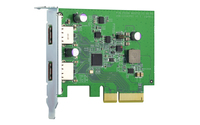
QNAP QXP-10G2U3A - PCIe - USB 3.2 Gen 2
2x USB 3.2 A - PCIe x2 2.0 - 89.65x68.9x14 mm - PCIe 2.0 - NAS / storage server - 0 - 40 °C - 5 - 95%
Brand: QNAP
SKU: QXP-10G2U3A
$140.34
Price as listed. Shipping charges calculated at checkout.
In stock

Do you have any question about this product or its specs? Want to know more? Click here to contact our pre-sales consultant and make the right purchase.
 NOTE: The information below is provided for your convenience only; the accuracy of the specifications cannot be guaranteed. However, if necessary, please check with us before purchasing. Data provided by 1 World Sync.
General
Host interface
PCIe
Output interface
USB 3.2 Gen 2 (3.1 Gen 2)
Expansion card standard
PCIe 2.0
Purpose
NAS / Storage server
Windows operating systems supported
Windows 10,Windows 8,Windows 8.1
Width
68.9 mm
Depth
89.7 mm
Height
14 mm
QNAP QXP-10G2U3A. Host interface: PCIe, Output interface: USB 3.2 Gen 2 (3.1 Gen 2), Expansion card standard: PCIe 2.0. Purpose: NAS / Storage server. Windows operating systems supported: Windows 10,Windows 8,Windows 8.1. Width: 68.9 mm, Depth: 89.7 mm, Height: 14 mm
| Estimate Gross Weight | 0.171 |
|---|
https://www.qnap.com/en/product/usb3.2-expansion-card
The QNAP USB 3.2 Gen 2 Expansion Card provides speeds of up to 10Gbps ΓÇô double that of USB 3.2 Gen 1 ΓÇô to greatly boost data transfer speeds. With two ports, the QNAP USB 3.2 Gen 2 Expansion Card provides compatibility with newer, faster USB 3.2 Gen 2 devices to accelerate file transfers and backup. The QNAP USB 3.2 Gen 2 Expansion Card can be installed in either a QNAP NAS or Windows/Ubuntu PC.
Experience USB 3.2 Gen 2 SuperSpeed+ up to 10Gbps
The QNAP USB 3.2 Gen 2 Expansion Card provides speeds of up to 10Gbps ΓÇô double that of USB 3.2 Gen 1, and 20 times that of USB 2.0.
Expand your Storage by Connecting to a QNAP USB JBOD
By using a QNAP USB 3.2 Gen 2 Expansion Card in your QNAP NAS or PC, you can connect a QNAP USB JBOD to back up and expand your storage. The USB 3.2 Gen 2 Expansion Card supports both QNAP NAS and Windows/Ubuntu PCs without requiring drivers. You can configure RAID and monitor disk health using the QTS/QuTS hero Storage & Snapshots Manager on a QNAP NAS, or by using the QNAP JBOD Manager utility on your computer.
- Dual-port USB 3.2 Gen 2 Type-A connectivity. Both ports provide up to 10 Gbps data transfer speeds and are backwards compatible with previous-generation USB devices
- Supports USB Attached SCSI Protocol (UASP) to provide convenient fast file sharing and intensive data transfer
- Uses advanced low-power processes, following standard PCIe/USB bus Power Management to reduce power consumption
- Supports overcurrent detection and short circuit protection
- Supports Windows 8.x / 10 (32/64-bit) and Ubuntu desktop 20.04 LTS. No driver is required
0.0
0 review(s)
Inside NetworkDistri
From our network to yours.
Every day, technology moves through our operation — received, checked, prepared and dispatched to customers. The images below show real equipment handled through our operation, not stock photography.
Real operations
Technology we actually handle
01
Source
Global supply
02
Receive
Goods arrive
03
Prepare
Process & pack
04
Dispatch
On the way