
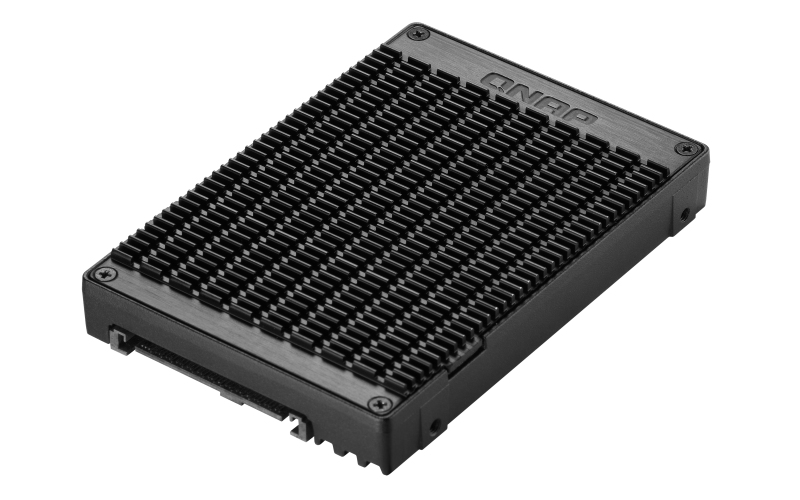
QNAP QDA-UMP4 - Interface adapter - PCIe 4.0 x4 (NVMe) - U.2
QNAP QDA-UMP4 - Interface adapter - PCIe 4.0 x4 (NVMe) - U.2
Brand: QNAP
SKU: QDA-UMP4
$131.88
Price as listed. Shipping charges calculated at checkout.
Low stock — only 1 left

Do you have any question about this product or its specs? Want to know more? Click here to contact our pre-sales consultant and make the right purchase.
 NOTE: The information below is provided for your convenience only; the accuracy of the specifications cannot be guaranteed. However, if necessary, please check with us before purchasing. Data provided by 1 World Sync.
General
Product type
SSD enclosure
Number of storage drives supported
4
Storage drive size
2.5 "
Supported storage drive interfaces
M.2
Installed storage drive type
SSD
Product colour
Black
QNAP QDA-UMP4. Product type: SSD enclosure. Number of storage drives supported: 4, Storage drive size: 2.5", Supported storage drive interfaces: M.2, Installed storage drive type: SSD. Product colour: Black
| Estimate Gross Weight | 0.2 |
|---|
https://www.qnap.com/en-uk/product/qda-ump4
QDA-UMP4
Install an M.2 PCIe 4.0 NVMe SSD in a U.2 PCIe NVMe SSD slot for PC and NAS
The QDA-UMP4 allows installing an M.2 PCIe 4.0 x4 NVMe SSD in a 2.5-inch U.2 (SFF-8639) PCIe 4.0 x4 NVMe SSD drive bay. No extra software or drivers are required for the QDA-UMP4 and it can be installed in a PC/workstation (Windows®, Linux®) or QNAP NAS to enable using M.2 SSDs as cost-effective alternatives to expensive U.2 SSDs.
High-quality construction for better heat dissipation
The M.2 SSD thermal pads and aluminum-alloy metal frame assist in dissipating heat from the M.2 SSD to ensure high performance.
Install in a PC/workstation for higher performance with lower costs
By using the QDA-UMP4 to install a M.2 SSD in the 2.5-inch U.2 SSD tray of a high-end PC/workstation (Windows® or Linux®), you can obtain a more budget-friendly way to supercharge bandwidth-demanding applications (such as on-the-fly video editing, server-grade applications, or online gaming). The status of the installed SSDs can be monitored using your preferred monitoring tool (such as manufacturer-provided utilities or third-party software like CrystalDiskInfo).
Install in QNAP NAS for efficient yet cost-effective storage
By allowing you to use M.2 SSDs instead of U.2 SSDs, the QDA-UMP4 enables you to optimize data-intensive applications in more cost-effective way. It can also boost IOPS performance when configuring SSD caching. Users can monitor drive health and manage SSD usage from the QTS Storage & Snapshots Manager.
Maintain high performance with cost savings
Using the QDA-UMP4 enables using M.2 NVMe SSDs as alternatives to U.2 NVMe SSDs, ensuring high-level performance at a more cost-effective price point.
QDA-UMP4
Install an M.2 PCIe 4.0 NVMe SSD in a U.2 PCIe NVMe SSD slot for PC and NAS
The QDA-UMP4 allows installing an M.2 PCIe 4.0 x4 NVMe SSD in a 2.5-inch U.2 (SFF-8639) PCIe 4.0 x4 NVMe SSD drive bay. No extra software or drivers are required for the QDA-UMP4 and it can be installed in a PC/workstation (Windows®, Linux®) or QNAP NAS to enable using M.2 SSDs as cost-effective alternatives to expensive U.2 SSDs.
High-quality construction for better heat dissipation
The M.2 SSD thermal pads and aluminum-alloy metal frame assist in dissipating heat from the M.2 SSD to ensure high performance.
Install in a PC/workstation for higher performance with lower costs
By using the QDA-UMP4 to install a M.2 SSD in the 2.5-inch U.2 SSD tray of a high-end PC/workstation (Windows® or Linux®), you can obtain a more budget-friendly way to supercharge bandwidth-demanding applications (such as on-the-fly video editing, server-grade applications, or online gaming). The status of the installed SSDs can be monitored using your preferred monitoring tool (such as manufacturer-provided utilities or third-party software like CrystalDiskInfo).
Install in QNAP NAS for efficient yet cost-effective storage
By allowing you to use M.2 SSDs instead of U.2 SSDs, the QDA-UMP4 enables you to optimize data-intensive applications in more cost-effective way. It can also boost IOPS performance when configuring SSD caching. Users can monitor drive health and manage SSD usage from the QTS Storage & Snapshots Manager.
Maintain high performance with cost savings
Using the QDA-UMP4 enables using M.2 NVMe SSDs as alternatives to U.2 NVMe SSDs, ensuring high-level performance at a more cost-effective price point.
- Use an M.2 2280 (M key) PCIe NVMe SSD in a U.2 PCIe NVMe SSD drive bay (M.2 SSD sold separately)
- Up to PCIe 4.0 x4 file transfer speeds (Compatible with NVMe PCIe 3.0 for M.2 SSDs and U.2 drive bays)
0.0
0 review(s)
Inside NetworkDistri
From our network to yours.
Every day, technology moves through our operation — received, checked, prepared and dispatched to customers. The images below show real equipment handled through our operation, not stock photography.
Real operations
Technology we actually handle
01
Source
Global supply
02
Receive
Goods arrive
03
Prepare
Process & pack
04
Dispatch
On the way