

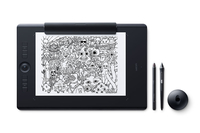
Wacom Intuos Pro Paper - Wired - Pen - Touch - 2 m
Pressure levels 8192 - 311 x 216 mm - 5080 lpi - Bluetooth 4.2 - USB - 430 x 287 x 8 mm - 1300 g - Black
Brand: Wacom
SKU: PTH-860P-N
$876.96
Price as listed. Shipping charges calculated at checkout.
Out of stock

Do you have any question about this product or its specs? Want to know more? Click here to contact our pre-sales consultant and make the right purchase.
 NOTE: The information below is provided for your convenience only; the accuracy of the specifications cannot be guaranteed. However, if necessary, please check with us before purchasing. Data provided by 1 World Sync.
General
Connectivity technology
Wired
Resolution
5080 lpi
Working area
311 x 216 mm
Cable length
2 m
Product colour
Black
Certification
US: FC, CEC (California EnergyCommision), RBRC, Mercury Labeling Requirements, EU/EEA/SW/Turkey: CE,RoHS, Kuwait: Ministry of Communications, Japan: VCCI, Radio Act, China: SRRC (CMIIT), China RoHS, GB, Australia/New Zealand: RCM, IDA, Singapore: IDA
Windows operating systems supported
Windows 10 Education,Windows 10 Education x64,Windows 10 Enterprise,Windows 10 Enterprise x64,Windows 10 Home,Windows 10 Home x64,Windows 10 IOT Core,Windows 10 Pro,Windows 10 Pro x64,Windows 7 Enterprise,Windows 7 Enterprise x64,Windows 7 Home Basic,Windows 7 Home Basic x64,Windows 7 Home Premium,Windows 7 Home Premium x64,Windows 7 Professional,Windows 7 Professional x64,Windows 7 Starter,Windows 7 Starter x64,Windows 7 Ultimate,Windows 7 Ultimate x64,Windows 8,Windows 8 Enterprise,Windows 8 Enterprise x64,Windows 8 Pro,Windows 8 Pro x64,Windows 8 x64,Windows 8.1,Windows 8.1 Enterprise,Windows 8.1 Enterprise x64,Windows 8.1 Pro,Windows 8.1 Pro x64,Windows 8.1 x64
Mac operating systems supported
Mac OS X 10.10 Yosemite,Mac OS X 10.11 El Capitan,Mac OS X 10.12 Sierra
Width
430 mm
Depth
287 mm
Height
8 mm
Wacom Intuos Pro Paper. Connectivity technology: Wired, Resolution: 5080 lpi, Working area: 311 x 216 mm. Cable length: 2 m. Product colour: Black, Certification: US: FC, CEC (California EnergyCommision), RBRC, Mercury Labeling Requirements EU/EEA/SW/Turkey:.... Windows operating systems supported: Windows 10 Education,Windows 10 Education x64,Windows 10 Enterprise,Windows 10 Enterprise..., Mac operating systems supported: Mac OS X 10.10 Yosemite,Mac OS X 10.11 El Capitan,Mac OS X 10.12 Sierra. Width: 430 mm, Depth: 287 mm, Height: 8 mm
| Estimate Gross Weight | 1.3 |
|---|
https://www.wacom.com/en-de/products/pen-tablets/intuos-pro-paper#Specifications
Redefining the professional standard in creative pen tablets… with paper
Wacom Intuos Pro Paper Edition combines the very latest Wacom technologies with the drawing paper of your choice to offer a new – but familiar – way of working. Enjoy the feel of drawing with the Finetip Pen on paper while Wacom Intuos Pro Paper Edition captures every stroke, ready for further work in your favorite software. Or connect Wacom Intuos Pro Paper Edition to your computer and work directly into any application you choose with the Wacom Pro Pen 2.
Live. Dare. Create.
New Wacom Pro Pen 2: natural and precise
Our new Wacom Pro Pen 2 is designed to quickly become a natural extension of your hand. Its exceptional sensitivity and responsiveness gives you the control you need to take your work to the next level.
Outstanding pressure sensitivity
Natural tilt support
Virtually no lag
No batteries or recharging
An age-old way to be creative, brought up to date
Wacom Intuos Pro Paper Edition adds a new medium to your digital workflow - paper.
Paper-to-digital workflow, step by step:
1. Clip your favorite drawing paper on the surface of the Wacom Intuos Pro Paper Edition and sketch with that familiar feel. Work on A5 paper (half-letter size) with our Medium model and A4 paper (letter size) with the Large model.
2. As you draw with the Finetip Pen (or optional Ballpoint Pen), Wacom Intuos Pro Paper Edition captures every stroke as an editable file that can be opened in your favorite creative software.
3. You don't need to be connected to a computer or the internet; Wacom Intuos Pro Paper Edition will store up to 200 multi-layered or 1000 one-layered drawings, ready for you to access on other devices
4. Connect Wacom Intuos Pro Paper Edition to your computer with USB. Using Inkspace*, you can sync, store and export your sketches in common creative file formats - including layered raster and vector.
5. Continue your work with your Wacom Intuos Pro attached to your computer and the sensitive new Wacom Pro Pen 2.
Convert your paper sketches to layered raster and vector formats
Wacom Intuos Pro Paper Edition comes with invaluable Inkspace features* specifically designed for artists and designers. They give you total, flexible control over your work:
Export your work in layered raster or vector formats (such as PSD and SVG)
Sync your creations across multiple devices
Share your creative projects with colleagues and clients
Work your way
Wacom Intuos Pro Paper Edition is designed to let you focus on what’s important – your creativity.
Customizable ExpressKeysâ„¢ and Touch Ring provide quick and easy shortcuts for everyday tasks.
Multi-touch gestures make navigating around your work as simple as using your smartphone.
Wacom Pro Pen 2’s side switches put shortcuts and controls literally at your fingertips.
Nail every detail with our 0.4mm diameter Finetip Pen - a smooth gel-ink pen with replaceable refills* that works in harmony with Wacom Intuos Pro Paper Edition.
Choose from three different Texture Sheets* to change the feel of your Wacom Intuos Pro. Each simulates different drawing papers, from smooth to rough.
Choose your Wacom Intuos Pro Paper Edition
Wacom Intuous Pro Paper Edition is available in two sizes. Medium is lighter and more compact, ready to slip into your bag and take wherever you need to sketch. Large offers the most expansive drawing area.
Redefining the professional standard in creative pen tablets… with paper
Wacom Intuos Pro Paper Edition combines the very latest Wacom technologies with the drawing paper of your choice to offer a new – but familiar – way of working. Enjoy the feel of drawing with the Finetip Pen on paper while Wacom Intuos Pro Paper Edition captures every stroke, ready for further work in your favorite software. Or connect Wacom Intuos Pro Paper Edition to your computer and work directly into any application you choose with the Wacom Pro Pen 2.
Live. Dare. Create.
New Wacom Pro Pen 2: natural and precise
Our new Wacom Pro Pen 2 is designed to quickly become a natural extension of your hand. Its exceptional sensitivity and responsiveness gives you the control you need to take your work to the next level.
Outstanding pressure sensitivity
Natural tilt support
Virtually no lag
No batteries or recharging
An age-old way to be creative, brought up to date
Wacom Intuos Pro Paper Edition adds a new medium to your digital workflow - paper.
Paper-to-digital workflow, step by step:
1. Clip your favorite drawing paper on the surface of the Wacom Intuos Pro Paper Edition and sketch with that familiar feel. Work on A5 paper (half-letter size) with our Medium model and A4 paper (letter size) with the Large model.
2. As you draw with the Finetip Pen (or optional Ballpoint Pen), Wacom Intuos Pro Paper Edition captures every stroke as an editable file that can be opened in your favorite creative software.
3. You don't need to be connected to a computer or the internet; Wacom Intuos Pro Paper Edition will store up to 200 multi-layered or 1000 one-layered drawings, ready for you to access on other devices
4. Connect Wacom Intuos Pro Paper Edition to your computer with USB. Using Inkspace*, you can sync, store and export your sketches in common creative file formats - including layered raster and vector.
5. Continue your work with your Wacom Intuos Pro attached to your computer and the sensitive new Wacom Pro Pen 2.
Convert your paper sketches to layered raster and vector formats
Wacom Intuos Pro Paper Edition comes with invaluable Inkspace features* specifically designed for artists and designers. They give you total, flexible control over your work:
Export your work in layered raster or vector formats (such as PSD and SVG)
Sync your creations across multiple devices
Share your creative projects with colleagues and clients
Work your way
Wacom Intuos Pro Paper Edition is designed to let you focus on what’s important – your creativity.
Customizable ExpressKeysâ„¢ and Touch Ring provide quick and easy shortcuts for everyday tasks.
Multi-touch gestures make navigating around your work as simple as using your smartphone.
Wacom Pro Pen 2’s side switches put shortcuts and controls literally at your fingertips.
Nail every detail with our 0.4mm diameter Finetip Pen - a smooth gel-ink pen with replaceable refills* that works in harmony with Wacom Intuos Pro Paper Edition.
Choose from three different Texture Sheets* to change the feel of your Wacom Intuos Pro. Each simulates different drawing papers, from smooth to rough.
Choose your Wacom Intuos Pro Paper Edition
Wacom Intuous Pro Paper Edition is available in two sizes. Medium is lighter and more compact, ready to slip into your bag and take wherever you need to sketch. Large offers the most expansive drawing area.
0.0
0 review(s)
Inside NetworkDistri
From our network to yours.
Every day, technology moves through our operation — received, checked, prepared and dispatched to customers. The images below show real equipment handled through our operation, not stock photography.
Real operations
Technology we actually handle
01
Source
Global supply
02
Receive
Goods arrive
03
Prepare
Process & pack
04
Dispatch
On the way





































