

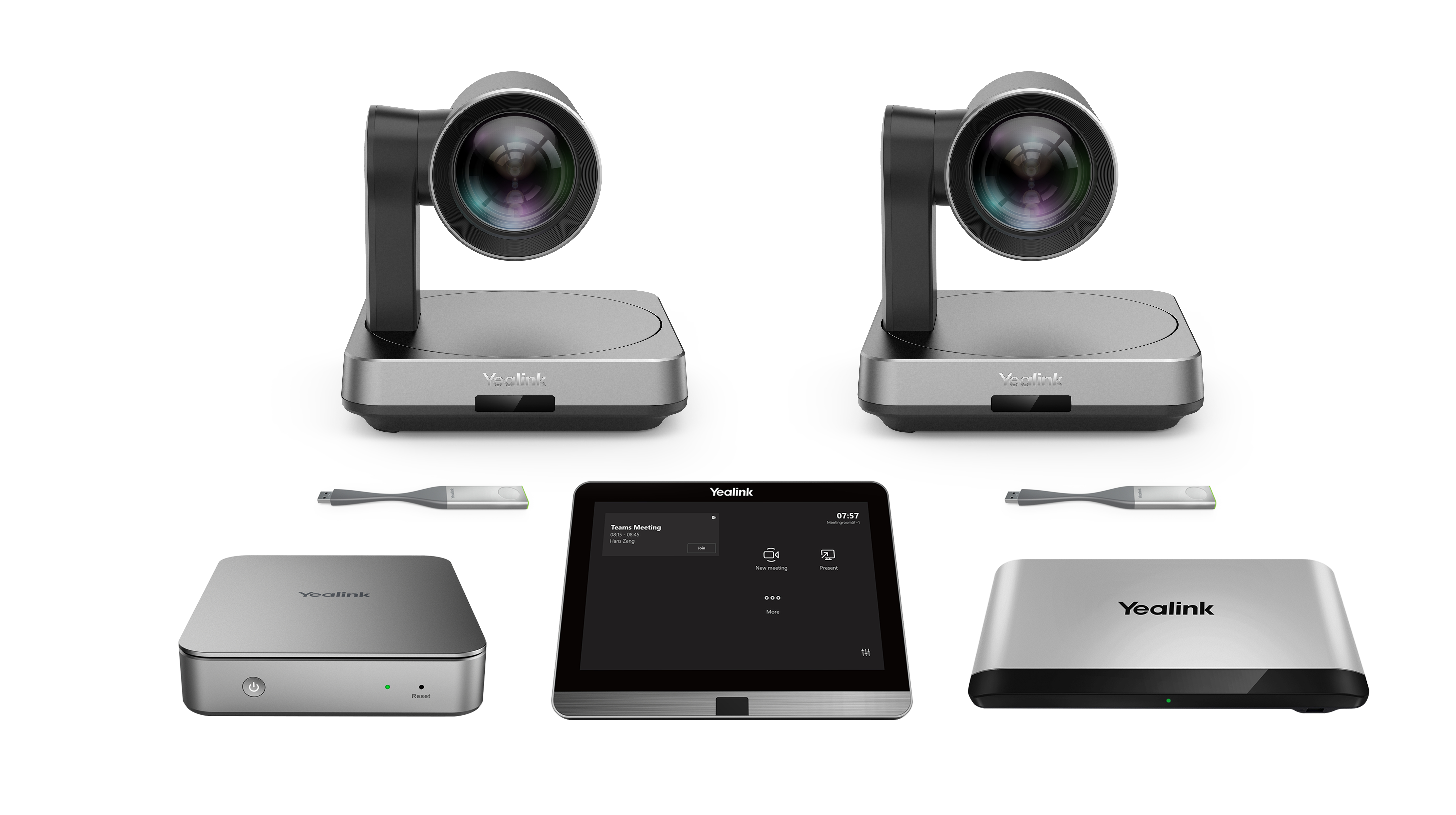
Yealink NATIVE MS TEAMS ROOMS F X-LARGE MVC940 II-C2-002
NATIVE MS Teams Room F X-LARGE - MVC940 II-C2-002
Brand: Yealink
SKU: MVC940 II-C2-002
$5,951.88
Price as listed. Shipping charges calculated at checkout.
In stock

Do you have any question about this product or its specs? Want to know more? Click here to contact our pre-sales consultant and make the right purchase.
 NOTE: The information below is provided for your convenience only; the accuracy of the specifications cannot be guaranteed. However, if necessary, please check with us before purchasing. Data provided by 1 World Sync.
|
|
||||||||||||||||||||||||||||||||||||||||||||||||||||||||||||||||||||||||
|
||||||||||||||||||||||||||||||||||||||||||||||||||||||||||||||||||||||||
NATIVE MS Teams Rooms F X-LARGE
https://www.yealink.com/
Yealink MVC series are native and easy-to-use video conferencing solutions specially designed for Microsoft Teamsrooms. The MVC series provides a full-scene video conference solution to cover all of the meeting rooms from large tosmall. According to the unique characteristics of the video conferencing room, a high-performance mini-PC is speciallyreleased. In the design of mini-PC, it takes into account both aesthetics and practicability, that fully integrating the cablemanagement with itself to provide a flexible and reliable deployment solution for any meeting room. The MVC seriesfeatures the native Microsoft Teams-tailored user interface that is easy to be operated with close-to-zero learning curve,and you just walk into the meeting room and start your scheduled Teams or Skype for Business meeting with one-touchjoin. Yealink MVC940 includes two UVC84 USB PTZ cameras with 12x optical zoom and it provides you with amulti-camera solution that supports camera layout adjustment to meet the requirements of extra-large meeting rooms.
Native Microsoft Teams-tailored user interface, smooth conference experience
Native Microsoft Teams-tailored user interface offers a one-touch meeting join. Designed with the idea of multi-function all-in-one, theMTouch II touch panel allows you easily perform call control, camera control, content sharing and other functions. At the same time, MTouchII has a built-in Human Motion Sensor that the conference system can be automatically waken up and you can immediately start the conference.
Multi-camera solution, support camera layout
Yealink Camera-Hub can be used with multiple UVC84s to provide a multi-camera solution with the feature of camera, and users canflexibly switch the camera layouts as needed. The UVC84 camera supports 4K UHD video resolution and is equipped with 12x optical zoomto provide clear and lossless video images.
Content sharing in real time
The unique wireless content sharing solution provides participants with maximum flexibility, that a one-click content sharing can be simplyrealized by plugging into the WPP20 only. With a high resolution of 1080P / 30 frames, it provides users with a better content sharing experience. Besides, the wired content sharing is also available by connecting to the USB-C port or HDMI port.
Simple to deploy, easy to use
With the VCH port, MCore is specially designed for the video meeting rooms that the deployment can be easily extended. At the same time,its all-in-one design with the feature of cable management ensure the stability of the wire connection, and the most appropriate deploymentcan be achieved according to the layout of the meeting room. One CAT5e is totally enough to connect the TV area and the conference tablearea and to complete the data transmission and power supply, no additional power supply or extension cable is needed, which not onlysimplifying the deployment but also effectively reducing deployment costs.
Manage your devices remotely
This solution supports Yealink Device Management Platform/Cloud Service, you can flawlessly manage, monitor, configure, update anddiagnose all Yealink audio and video devices peripherals on this platform remotely.
Yealink MVC series are native and easy-to-use video conferencing solutions specially designed for Microsoft Teamsrooms. The MVC series provides a full-scene video conference solution to cover all of the meeting rooms from large tosmall. According to the unique characteristics of the video conferencing room, a high-performance mini-PC is speciallyreleased. In the design of mini-PC, it takes into account both aesthetics and practicability, that fully integrating the cablemanagement with itself to provide a flexible and reliable deployment solution for any meeting room. The MVC seriesfeatures the native Microsoft Teams-tailored user interface that is easy to be operated with close-to-zero learning curve,and you just walk into the meeting room and start your scheduled Teams or Skype for Business meeting with one-touchjoin. Yealink MVC940 includes two UVC84 USB PTZ cameras with 12x optical zoom and it provides you with amulti-camera solution that supports camera layout adjustment to meet the requirements of extra-large meeting rooms.
Native Microsoft Teams-tailored user interface, smooth conference experience
Native Microsoft Teams-tailored user interface offers a one-touch meeting join. Designed with the idea of multi-function all-in-one, theMTouch II touch panel allows you easily perform call control, camera control, content sharing and other functions. At the same time, MTouchII has a built-in Human Motion Sensor that the conference system can be automatically waken up and you can immediately start the conference.
Multi-camera solution, support camera layout
Yealink Camera-Hub can be used with multiple UVC84s to provide a multi-camera solution with the feature of camera, and users canflexibly switch the camera layouts as needed. The UVC84 camera supports 4K UHD video resolution and is equipped with 12x optical zoomto provide clear and lossless video images.
Content sharing in real time
The unique wireless content sharing solution provides participants with maximum flexibility, that a one-click content sharing can be simplyrealized by plugging into the WPP20 only. With a high resolution of 1080P / 30 frames, it provides users with a better content sharing experience. Besides, the wired content sharing is also available by connecting to the USB-C port or HDMI port.
Simple to deploy, easy to use
With the VCH port, MCore is specially designed for the video meeting rooms that the deployment can be easily extended. At the same time,its all-in-one design with the feature of cable management ensure the stability of the wire connection, and the most appropriate deploymentcan be achieved according to the layout of the meeting room. One CAT5e is totally enough to connect the TV area and the conference tablearea and to complete the data transmission and power supply, no additional power supply or extension cable is needed, which not onlysimplifying the deployment but also effectively reducing deployment costs.
Manage your devices remotely
This solution supports Yealink Device Management Platform/Cloud Service, you can flawlessly manage, monitor, configure, update anddiagnose all Yealink audio and video devices peripherals on this platform remotely.
0.0
0 review(s)
Inside NetworkDistri
From our network to yours.
Every day, technology moves through our operation — received, checked, prepared and dispatched to customers. The images below show real equipment handled through our operation, not stock photography.
Real operations
Technology we actually handle
01
Source
Global supply
02
Receive
Goods arrive
03
Prepare
Process & pack
04
Dispatch
On the way





































