

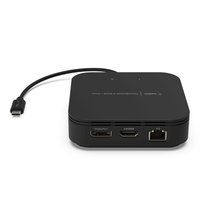
Belkin Thunderbolt 3 Dock Core
Belkin Thunderbolt 3 Dock Core - Docking station - Thunderbolt 3 - HDMI, DP - GigE
Brand: Belkin
SKU: F4U110BT
$164.67
Price as listed. Shipping charges calculated at checkout.
Out of stock

Do you have any question about this product or its specs? Want to know more? Click here to contact our pre-sales consultant and make the right purchase.
 NOTE: The information below is provided for your convenience only; the accuracy of the specifications cannot be guaranteed. However, if necessary, please check with us before purchasing. Data provided by 1 World Sync.
General
Connectivity technology
Wired
Host interface
Thunderbolt 3
USB Power Delivery
Y
USB Power Delivery up to
60 W
Product colour
Black
Maximum digital resolution
7680 x 4320 pixels
Maximum refresh rate
60 Hz
Power source type
USB
Width
100 mm
Depth
100 mm
Height
30 mm
Cable length
0.2 m
Belkin Thunderbolt 3 Dock Core. Connection technology: Wired, Host interface: Thunderbolt 3, USB Power Delivery up to: 60 W. Product color: Black, Maximum digital resolution: 7680 x 4320 pixels, Maximum refresh rate: 60 Hz. Width: 100 mm, Depth: 100 mm, Height: 30 mm. Cable length: 0.2 m
| Estimate Gross Weight | 0.289 |
|---|
https://www.belkin.com/us/p/P-F4U110/#
WORLD'S FIRST THUNDERBOLTâ„¢-CERTIFIED DUAL-POWERED DOCK
The Thunderbolt 3 Dock Core brings the speed, high-definition and performance of Thunderbolt technology to Mac and Windows laptops. With all the power and versatility of Thunderbolt 3, plus ports to connect multiple peripherals to a Thunderbolt laptop, this dock is a streamlined way to create an expanded, high-performing desktop through a single tethered cable.
CONNECT AN ENTIRE DESKTOP THROUGH A SINGLE CABLE
The tethered 6-inch Thunderbolt 3 cable connects multiple peripherals to your laptop, with ports for monitors, mouse, USB stick, keyboards, speakers, hard drives and more.
SIDE 1:
- 1 x DisplayPortâ„¢ 1.4 connects to high-resolution monitors/displays (for resolutions, see table below)
- 1 x HDMI (HDMI 2.0) port
- Gigabit Ethernet connection
SIDE 2:
- Tethered Thunderbolt 3 cable connects to laptop
- 1 x USB-C PD port (input)
SIDE 3:
- Audio in/out for mic and speaker support
- 1x USB-A 3.2 Gen 2(10Gbps) and 1x USB-A 2.0 ports for devices that connect via USB-A such as a USB stick, mouse, keyboard or printer
WORKS WITH THUNDERBOLT 3 DEVICES
The Thunderbolt 3 Dock Core is an ideal single-dock solution for businesses using MacBooks running Mac OS, and laptops running Windows. This broad compatibility is also ideal for shared work environments or temporary workstations where laptop users are looking for a high-performing workstation with minimal set up.
DUAL 4K MONITOR SUPPORT
Supports dual 4K 60Hz monitors for a versatile desktop configuration, via a dedicated DisplayPort and an HDMI 2.0 port. Also supports a single 5K monitor at 60Hz and capable of reaching 8K 30Hz.
Please see the table below for specific resolution capabilities for all monitor combinations.
DUAL-POWERED FUNCTIONALITY
When the Thunderbolt 3 dock is connected to a laptop, it powers peripheral devices connected to the dock without the need for a separate power cable. Keep your laptop charged by connecting its existing power supply unit (60W recommended) to the USB-C PD port on the Thunderbolt dock.
Thunderbolt and the Thunderbolt logo are trademarks of Intel Corporation or its subsidiaries.
WORLD'S FIRST THUNDERBOLTâ„¢-CERTIFIED DUAL-POWERED DOCK
The Thunderbolt 3 Dock Core brings the speed, high-definition and performance of Thunderbolt technology to Mac and Windows laptops. With all the power and versatility of Thunderbolt 3, plus ports to connect multiple peripherals to a Thunderbolt laptop, this dock is a streamlined way to create an expanded, high-performing desktop through a single tethered cable.
CONNECT AN ENTIRE DESKTOP THROUGH A SINGLE CABLE
The tethered 6-inch Thunderbolt 3 cable connects multiple peripherals to your laptop, with ports for monitors, mouse, USB stick, keyboards, speakers, hard drives and more.
SIDE 1:
- 1 x DisplayPortâ„¢ 1.4 connects to high-resolution monitors/displays (for resolutions, see table below)
- 1 x HDMI (HDMI 2.0) port
- Gigabit Ethernet connection
SIDE 2:
- Tethered Thunderbolt 3 cable connects to laptop
- 1 x USB-C PD port (input)
SIDE 3:
- Audio in/out for mic and speaker support
- 1x USB-A 3.2 Gen 2(10Gbps) and 1x USB-A 2.0 ports for devices that connect via USB-A such as a USB stick, mouse, keyboard or printer
WORKS WITH THUNDERBOLT 3 DEVICES
The Thunderbolt 3 Dock Core is an ideal single-dock solution for businesses using MacBooks running Mac OS, and laptops running Windows. This broad compatibility is also ideal for shared work environments or temporary workstations where laptop users are looking for a high-performing workstation with minimal set up.
DUAL 4K MONITOR SUPPORT
Supports dual 4K 60Hz monitors for a versatile desktop configuration, via a dedicated DisplayPort and an HDMI 2.0 port. Also supports a single 5K monitor at 60Hz and capable of reaching 8K 30Hz.
Please see the table below for specific resolution capabilities for all monitor combinations.
DUAL-POWERED FUNCTIONALITY
When the Thunderbolt 3 dock is connected to a laptop, it powers peripheral devices connected to the dock without the need for a separate power cable. Keep your laptop charged by connecting its existing power supply unit (60W recommended) to the USB-C PD port on the Thunderbolt dock.
Thunderbolt and the Thunderbolt logo are trademarks of Intel Corporation or its subsidiaries.
- World's first Thunderbolt-certified dual-powered dock
- Compatible with Thunderbolt-certified Mac and Windows laptops with a Thunderbolt 3 port
- Connect multiple devices to your laptop through one dock, including monitors, USB stick, mouse, keyboards, internet, hard drives and more
- Supports dual 4K UHD displays @ 60Hz
- 7 ports: 1 x Thunderbolt 3, 1 x USB-C PD, 1 x DisplayPort, 1 x HDMI, 1x USB-A 3.2 Gen 2(10Gbps), 1x USB-A 2.01, 1 x Audio in/out, 1 x Gigabit Ethernet
- Supports pass-through power from a laptop to connected devices
- Connect laptop’s power supply unit (60W recommended) to the dock to power the laptop
0.0
0 review(s)
Inside NetworkDistri
From our network to yours.
Every day, technology moves through our operation — received, checked, prepared and dispatched to customers. The images below show real equipment handled through our operation, not stock photography.
Real operations
Technology we actually handle
01
Source
Global supply
02
Receive
Goods arrive
03
Prepare
Process & pack
04
Dispatch
On the way





































