

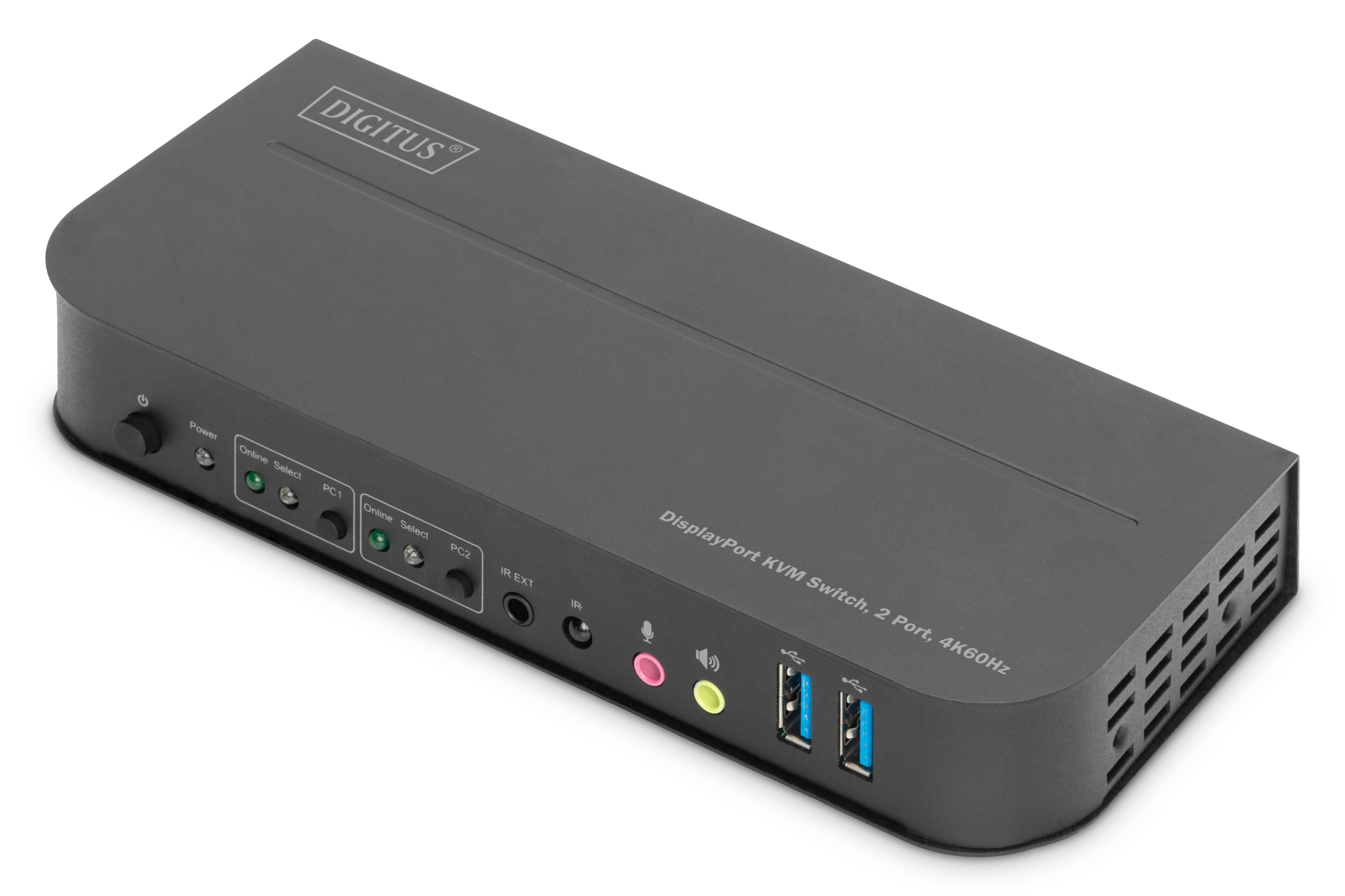
DIGITUS DS-12850 KVM USB Switch
Kvm Switch - 2-port - USB 3.0 - Displayport Input - HDMI Output - HDMI
Brand: DIGITUS
SKU: DS-12850
$191.88
Price as listed. Shipping charges calculated at checkout.
In stock

Do you have any question about this product or its specs? Want to know more? Click here to contact our pre-sales consultant and make the right purchase.
 NOTE: The information below is provided for your convenience only; the accuracy of the specifications cannot be guaranteed. However, if necessary, please check with us before purchasing. Data provided by 1 World Sync.
General
Keyboard port type
USB
Mouse port type
USB
Video port type
HDMI
HD type
4K Ultra HD
Maximum resolution
4096 x 2160 pixels
Video bandwidth
60 Hz
LED indicators
Status
Output voltage
5 V
Output current
3 A
Width
178 mm
Depth
75 mm
Height
29 mm
Digitus KVM Switch, 2-Port, 4K60Hz, 2 x DP in, 1 x DP/HDMI out. Keyboard port type: USB, Mouse port type: USB, Video port type: HDMI. HD type: 4K Ultra HD, Maximum resolution: 4096 x 2160 pixels, Video bandwidth: 60 Hz. LED indicators: Status. Output voltage: 5 V, Output current: 3 A. Width: 178 mm, Depth: 75 mm, Height: 29 mm
| Estimate Gross Weight | 1.0 |
|---|
https://www.digitus.info/
With the DIGITUS® 2-Port KVM Switch, you can operate two 4k-compatible PCs using a single USB keyboard and mouse. By pressing a button or using the remote control included in delivery, you can switch comfortably between the two PCs, sparing you the trouble of replugging all cables. Output to a monitor occurs either via the integrated HDMI® or the DisplayPort output. You can also switch between the audio signals for the microphone and speaker. In addition, two USB 3.0 ports are included on the front side for use with other peripheral devices like USB sticks or external hard drives on both PCs. If you place the KVM switch in an inaccessible location, you can use the IR receiver and connection cable included in delivery even if the KVM switch itself is not within the range of the remote control. Status LEDs on the front side of the switch show you the current configuration at all times. The slim switch features the added benefits of sturdy metal housing and the option of wall mounting.
┬╖ Use a monitor, a mouse and a keyboard to operate two computers
┬╖ USB ports for mouse and keyboard
┬╖ Audio connections for microphone/speaker
┬╖ Integrated USB hub with 2 x USB 3.0 connections for additional peripheral equipment
┬╖ Switching between the PCs via switch on the KVM switch, remote control or hot key on the keyboard
┬╖ External receiver for signals from remote control included
┬╖ Compatible with HDMI 2.0 / HDCP 2.2 / DisplayPort 1.2 / HDR / FreeSync
┬╖ LED status and functional displays on the front side
┬╖ Wall installation possible
┬╖ Plug and Play - no driver installation required
With the DIGITUS® 2-Port KVM Switch, you can operate two 4k-compatible PCs using a single USB keyboard and mouse. By pressing a button or using the remote control included in delivery, you can switch comfortably between the two PCs, sparing you the trouble of replugging all cables. Output to a monitor occurs either via the integrated HDMI® or the DisplayPort output. You can also switch between the audio signals for the microphone and speaker. In addition, two USB 3.0 ports are included on the front side for use with other peripheral devices like USB sticks or external hard drives on both PCs. If you place the KVM switch in an inaccessible location, you can use the IR receiver and connection cable included in delivery even if the KVM switch itself is not within the range of the remote control. Status LEDs on the front side of the switch show you the current configuration at all times. The slim switch features the added benefits of sturdy metal housing and the option of wall mounting.
┬╖ Use a monitor, a mouse and a keyboard to operate two computers
┬╖ USB ports for mouse and keyboard
┬╖ Audio connections for microphone/speaker
┬╖ Integrated USB hub with 2 x USB 3.0 connections for additional peripheral equipment
┬╖ Switching between the PCs via switch on the KVM switch, remote control or hot key on the keyboard
┬╖ External receiver for signals from remote control included
┬╖ Compatible with HDMI 2.0 / HDCP 2.2 / DisplayPort 1.2 / HDR / FreeSync
┬╖ LED status and functional displays on the front side
┬╖ Wall installation possible
┬╖ Plug and Play - no driver installation required
0.0
0 review(s)
Inside NetworkDistri
From our network to yours.
Every day, technology moves through our operation — received, checked, prepared and dispatched to customers. The images below show real equipment handled through our operation, not stock photography.
Real operations
Technology we actually handle
01
Source
Global supply
02
Receive
Goods arrive
03
Prepare
Process & pack
04
Dispatch
On the way





































