

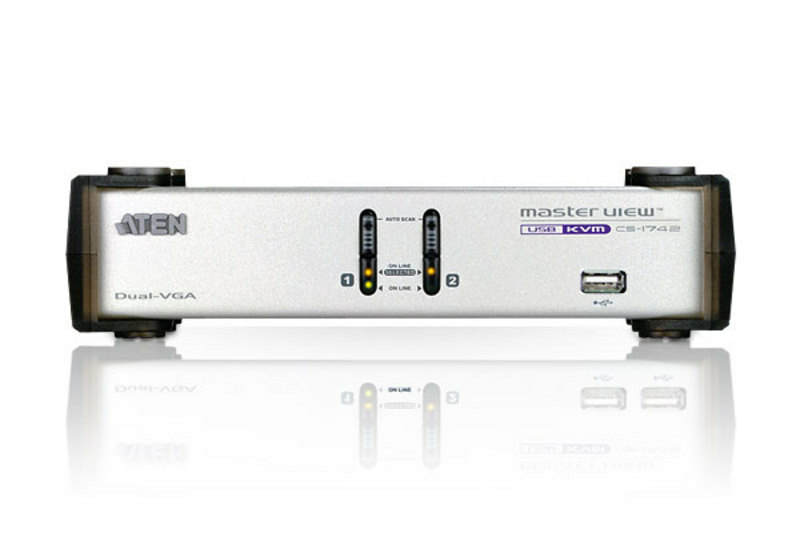
ATEN MasterView CS-1742 - KVM / audio / USB switch
Dual-View VGA KVM Switch with Audio & USB 2.0 Hub (KVM cables included)
Brand: ATEN
SKU: CS1742
$0.00
Price as listed. Shipping charges calculated at checkout.
Out of stock

Do you have any question about this product or its specs? Want to know more? Click here to contact our pre-sales consultant and make the right purchase.
 NOTE: The information below is provided for your convenience only; the accuracy of the specifications cannot be guaranteed. However, if necessary, please check with us before purchasing. Data provided by 1 World Sync.
General
Keyboard port type
USB
Mouse port type
USB
Video port type
VGA
Product colour
White
Power consumption (typical)
1.25 W
Weight
1.6 kg
Package dimensions (WxDxH)
222.2 x 98.4 x 266.7 mm
Package width
222.2 mm
Package depth
98.4 mm
Athens CS1742. Keyboard port type: USB, Mouse port type: USB, Video port type: VGA. Product colour: White. Power consumption (typical): 1.25 W. Weight: 1.6 kg. Package dimensions (WxDxH): 222.2 x 98.4 x 266.7 mm, Package width: 222.2 mm, Package depth: 98.4 mm
| Estimate Gross Weight | 1.79 |
|---|
https://www.aten.com/global/en/products/kvm/desktop-kvm-switches/cs1742/#.WgFy2XBwklQ
CS1742 2 Port KVM Switch integrates functions of video signal dual output and USB KVM switches. It allows a computer with dual-screen support to pair with two VGA/SVGA/Multisync displays via a USB keyboard and mouse. Furthermore, CS1742 provides 2 USB ports, allowing each server to share any USB peripheral device that is connected to this HUB.
Features:
-Allows one USB keyboard, USB mouse, speakers, microphone and two displays to control two dual display computers
-2 port USB Hub built in
-Multiplatform support: compatible with all operation platforms PC (Windows, Linux and most others), Mac and Sun
-With speaker and microphone support
-Bi-directional switching and flexible interoperability; switch permits independent PC, independent peripheral, and independent audio function, regardless of KVM switch focus
-Buzzer On/Off via hotkey
-Keyboard and mouse emulation for error free booting
-Computer selection via front panel pushbuttons and hotkeys
-Superior video quality - up to 2048 x 1536; DDC2B
-Firmware upgradeable
-OS Support:Windows 2000, Windows XP, Windows Vista, LINUX, Mac, Sun and FreeBSD
-SUN/Mac keyboard support and emulation*
*1.PC keyboard combinations emulate SUN/Mac keyboards.
*2.SUN/Mac keyboards only work with their own computers.
Package Contents
1x 2-Port USB Dual-View KVMPâ„¢ Switch
2x Custom KVM Cable (VGA, USB; 1.8m/6ft)
2x Custom KVM Cable (VGA, Audio; 1.8m/6ft)
1x Firmware Upgrade Cable
1x User Instructions
CS1742 2 Port KVM Switch integrates functions of video signal dual output and USB KVM switches. It allows a computer with dual-screen support to pair with two VGA/SVGA/Multisync displays via a USB keyboard and mouse. Furthermore, CS1742 provides 2 USB ports, allowing each server to share any USB peripheral device that is connected to this HUB.
Features:
-Allows one USB keyboard, USB mouse, speakers, microphone and two displays to control two dual display computers
-2 port USB Hub built in
-Multiplatform support: compatible with all operation platforms PC (Windows, Linux and most others), Mac and Sun
-With speaker and microphone support
-Bi-directional switching and flexible interoperability; switch permits independent PC, independent peripheral, and independent audio function, regardless of KVM switch focus
-Buzzer On/Off via hotkey
-Keyboard and mouse emulation for error free booting
-Computer selection via front panel pushbuttons and hotkeys
-Superior video quality - up to 2048 x 1536; DDC2B
-Firmware upgradeable
-OS Support:Windows 2000, Windows XP, Windows Vista, LINUX, Mac, Sun and FreeBSD
-SUN/Mac keyboard support and emulation*
*1.PC keyboard combinations emulate SUN/Mac keyboards.
*2.SUN/Mac keyboards only work with their own computers.
Package Contents
1x 2-Port USB Dual-View KVMPâ„¢ Switch
2x Custom KVM Cable (VGA, USB; 1.8m/6ft)
2x Custom KVM Cable (VGA, Audio; 1.8m/6ft)
1x Firmware Upgrade Cable
1x User Instructions
0.0
0 review(s)
Inside NetworkDistri
From our network to yours.
Every day, technology moves through our operation — received, checked, prepared and dispatched to customers. The images below show real equipment handled through our operation, not stock photography.
Real operations
Technology we actually handle
01
Source
Global supply
02
Receive
Goods arrive
03
Prepare
Process & pack
04
Dispatch
On the way





































