

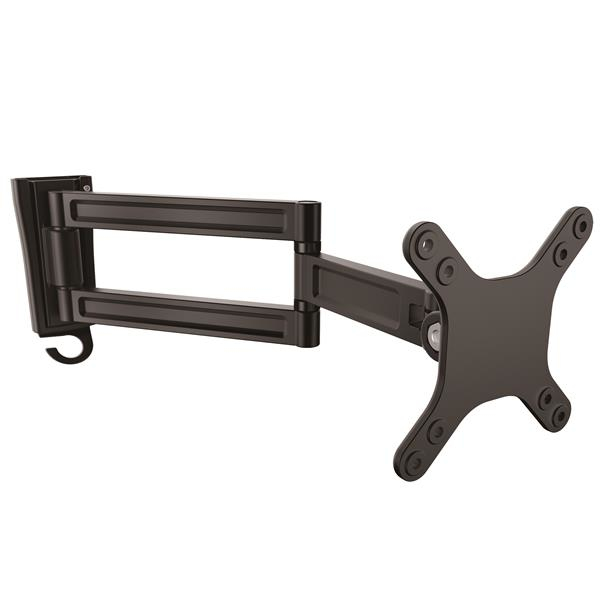
Monitor Wall Mount Dual Swivel 13-34in ARMWALLDS
Supports 13’’ to 27’’ Monitors - VESA Mount - TV Wall Mount - TV Mount (ARMWALLDS)
Brand: StarTech.com
SKU: ARMWALLDS
$107.88
Price as listed. Shipping charges calculated at checkout.
In stock

Do you have any question about this product or its specs? Want to know more? Click here to contact our pre-sales consultant and make the right purchase.
 NOTE: The information below is provided for your convenience only; the accuracy of the specifications cannot be guaranteed. However, if necessary, please check with us before purchasing. Data provided by 1 World Sync.
General
Maximum weight capacity
15 kg
Minimum screen size
33 cm
Maximum screen size
68.6 cm
Minimum VESA mount
75 x 75 mm
Maximum VESA mount
100 x 100 mm
Swivel angle range
-90 - 90 °
Product colour
Black
StarTech.com Wall-Mount Monitor Arm - Dual Swivel. Maximum weight capacity: 15 kg, Minimum screen size: 33 cm (13"), Maximum screen size: 68.6 cm (27"), Minimum VESA mount: 75 x 75 mm, Maximum VESA mount: 100 x 100 mm. Swivel angle range: -90 - 90°. Product colour: Black
| Estimate Gross Weight | 1.09 |
|---|
https://www.startech.com/product/ARMWALLDS
Save space by wall-mounting your monitor, and maximize viewing with the swiveling extension arm
Wall-mount your computer monitor or flat-screen TV to free up space on your desk or table. This wall-mount monitor arm supports flat-panel displays up to 34ΓÇ¥ and provides a full 15ΓÇ¥ (382 mm) arm extension for optimum screen adjustment. The pivoting arm swivels +90┬░ / - 90┬░, plus tilts and rotates to provide maximum viewing flexibility.
Save space by wall-mounting your flat-panel display
This monitor arm helps you save space on your desk or table surface, by letting you securely wall-mount a computer monitor or TV from 13ΓÇ¥ to 34ΓÇ¥ in size and up to 33 lb. (15kg) in weight. ItΓÇÖs ideal for many different applications, including business, healthcare or financial settings, where you may want to share your screen with patients, clients, or other visitors. The wall-mount monitor arm also works well in office settings or workspaces that back against a wall.
Adjust your screen position with ease
The monitor arm extends a full 15ΓÇ¥ (381 mm) making it easy to change your screen position, so you can work more comfortably or share your screen with others. The dual-swivel arm offers a full +90┬░ / - 90┬░ swivel, to move your screen easily to the left or right and share your screen with maximum viewing flexibility. It tilts freely +70┬░ / - 70┬░, allowing easy angle adjustment up or down to share your display, while collaborating with team members.
Easy installation
The aluminum wall-mount monitor arm features slide-in wall plate construction for easy installation. To help keep your work area free of clutter, the monitor arm also features a cable clip that keep your cables neatly out of sight.
The ARMWALLDS is backed by a StarTech.com 5-year warranty and free lifetime technical support.
The StarTech.com Advantage
- Wall mount a VESA (75x75, 100x100) compatible display 13" to 34", flat screen, curved or ultrawide, with a max weight of 33.2 lb. (15 kg)
- Save space by wall mounting your monitor or flat-screen TV and easily share your screen
- Arm extends a full 15ΓÇ¥ (382 mm)
Save space by wall-mounting your monitor, and maximize viewing with the swiveling extension arm
Wall-mount your computer monitor or flat-screen TV to free up space on your desk or table. This wall-mount monitor arm supports flat-panel displays up to 34ΓÇ¥ and provides a full 15ΓÇ¥ (382 mm) arm extension for optimum screen adjustment. The pivoting arm swivels +90┬░ / - 90┬░, plus tilts and rotates to provide maximum viewing flexibility.
Save space by wall-mounting your flat-panel display
This monitor arm helps you save space on your desk or table surface, by letting you securely wall-mount a computer monitor or TV from 13ΓÇ¥ to 34ΓÇ¥ in size and up to 33 lb. (15kg) in weight. ItΓÇÖs ideal for many different applications, including business, healthcare or financial settings, where you may want to share your screen with patients, clients, or other visitors. The wall-mount monitor arm also works well in office settings or workspaces that back against a wall.
Adjust your screen position with ease
The monitor arm extends a full 15ΓÇ¥ (381 mm) making it easy to change your screen position, so you can work more comfortably or share your screen with others. The dual-swivel arm offers a full +90┬░ / - 90┬░ swivel, to move your screen easily to the left or right and share your screen with maximum viewing flexibility. It tilts freely +70┬░ / - 70┬░, allowing easy angle adjustment up or down to share your display, while collaborating with team members.
Easy installation
The aluminum wall-mount monitor arm features slide-in wall plate construction for easy installation. To help keep your work area free of clutter, the monitor arm also features a cable clip that keep your cables neatly out of sight.
The ARMWALLDS is backed by a StarTech.com 5-year warranty and free lifetime technical support.
The StarTech.com Advantage
- Wall mount a VESA (75x75, 100x100) compatible display 13" to 34", flat screen, curved or ultrawide, with a max weight of 33.2 lb. (15 kg)
- Save space by wall mounting your monitor or flat-screen TV and easily share your screen
- Arm extends a full 15ΓÇ¥ (382 mm)
- Wall mount a VESA (75x75, 100x100) compatible display 13" to 34", flat screen, curved or ultrawide, with a max weight of 33.2 lb. (15 kg)
- Save space by wall mounting your monitor or flat-screen TV and easily share your screen
- Arm extends a full 15ΓÇ¥ (382 mm)
- Pivoting arm with +90┬░ / - 90┬░ swivel to provide maximum viewing flexibility
- Tilts freely +70┬░ / - 70┬░, allowing easy angle adjustment up or down
- Easy installation with slide-in wall plate construction
0.0
0 review(s)
Inside NetworkDistri
From our network to yours.
Every day, technology moves through our operation — received, checked, prepared and dispatched to customers. The images below show real equipment handled through our operation, not stock photography.
Real operations
Technology we actually handle
01
Source
Global supply
02
Receive
Goods arrive
03
Prepare
Process & pack
04
Dispatch
On the way





































