

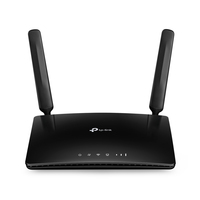
TP-LINK ARCHER MR400 WLAN LTE Router

 NOTE: The information below is provided for your convenience only; the accuracy of the specifications cannot be guaranteed. However, if necessary, please check with us before purchasing. Data provided by 1 World Sync.
General
Supported network protocols
IPv4, IPv6
3G standards
DC-HSPA+,HSPA,HSPA+,UMTS
4G
Y
3G
Y
4G standard
LTE
2G standards
EDGE,GPRS,GSM
Security algorithms
64-bit WEP,128-bit WEP,WPA,WPA-PSK,WPA2,WPA2-PSK
Networking standards
IEEE 802.11a,IEEE 802.11ac,IEEE 802.11b,IEEE 802.11g,IEEE 802.11n
Ethernet LAN
Y
Ethernet LAN interface type
Fast Ethernet
Ethernet LAN data rates
10,100 Mbit/s
Top Wi-Fi standard
Wi-Fi 5 (802.11ac)
WLAN data transfer rate (max)
867 Mbit/s
Wi-Fi band
Dual-band (2.4 GHz / 5 GHz)
TP-LINK ARCHER MR400. Wi-Fi band: Dual-band (2.4 GHz / 5 GHz), Top Wi-Fi standard: Wi-Fi 5 (802.11ac), WLAN data transfer rate (max): 867 Mbit/s. Ethernet LAN interface type: Fast Ethernet, Networking standards: IEEE 802.11a,IEEE 802.11ac,IEEE 802.11b,IEEE 802.11g,IEEE 802.11n, Ethernet LAN data rates: 10,100 Mbit/s. 2G standards: EDGE,GPRS,GSM, 3G standards: DC-HSPA+,HSPA,HSPA+,UMTS, 4G standard: LTE. Security algorithms: 64-bit WEP,128-bit WEP,WPA,WPA-PSK,WPA2,WPA2-PSK. Supported network protocols: IPv4, IPv6
| Estimate Gross Weight | 0.651 |
|---|
4G LTE with AC1200 Wi-Fi to Stream from Everywhere
AC1200 Wireless Dual Band 4G LTE Router
Archer MR400
Got SIM Card?
Then Plug and Play!
With an integrated 4G LTE modem and a built-in SIM card slot, all you need to do is insert a micro SIM card and turn on the Router. Enjoying fast, stable Wi-Fi on a 4G LTE network has never been easier.
Share Your 4G LTE Network
Take full of advantage of your cutting-edge 4G LTE network for download speeds of up to 150 Mbps. Share your 4G LTE network with multiple Wi-Fi devices and enjoy uninterrupted HD movies, rapid file downloads, and smooth video chats. Fully compatible with FDD-LTE and TDD-LTE to work with most service providers worldwide.
Wi-Fi Where You Need It
Enjoy unmatched convenience and versatility. Tested in the field for years to ensure universal compatibility with 2 advanced LTE antennas to deliver a smooth connection. Simply plug in a micro SIM card and power on this elegant piece of technology to utilize fast and stable Wi-Fi, whether youΓÇÖre at home or working remote.
Internet Access for
up to 64 Devices Simultaneously
Easily share a 3G/4G connection with up to 64 wireless devices, such as phones, tablets, and laptops, at the same time. 4 LAN ports stand ready to provide internet for wired devices like desktop computers.
Easy Setup and Management
Set up the Archer MR400 in minutes thanks to its intuitive web interface and the powerful Tether app. Tether also lets you manage its network settings from any Android or iOS device, including parental controls and access control.
- Cutting-edge 4G network ΓÇô share internet access with up to 64 Wi-Fi devices and enjoy download speeds of up to 150 Mbps
- AC1200 Wi-Fi ΓÇô creates simultaneous dual band Wi-Fi networks, with maximum speeds of up to 300 Mbps on the 2.4 GHz band and 867 Mbps on the 5 GHz band
- Plug a SIM card and play ΓÇô no configurations needed, compatibility for SIM cards in 100+ countries are assured by years of field tests
- Two detachable advanced LTE antennas ΓÇô enjoy stable and efficient connections to every device thanks to the two external antennas
- Wi-Fi router mode ΓÇô plug an Ethernet cable into the LAN/WAN port for flexible access as a backup option if you can't get a 4G connection
Inside NetworkDistri
From our network to yours.
Every day, technology moves through our operation — received, checked, prepared and dispatched to customers. The images below show real equipment handled through our operation, not stock photography.





































