

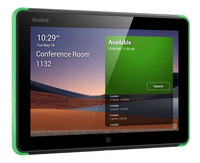
Yealink RoomPanel for Microsoft Teams Touch Screen (1303110)
Yealink RoomPanel for Microsoft Teams - Touch screen - display - LCD - 8"
Brand: Yealink
SKU: 1303110
$671.88
Price as listed. Shipping charges calculated at checkout.
Low stock — only 1 left

Do you have any question about this product or its specs? Want to know more? Click here to contact our pre-sales consultant and make the right purchase.
 NOTE: The information below is provided for your convenience only; the accuracy of the specifications cannot be guaranteed. However, if necessary, please check with us before purchasing. Data provided by 1 World Sync.
|
|
|||||||||||||||||||||||||||||||||||||||||||||||||||||||||||||||||||||||||||||||||||||||
|
|||||||||||||||||||||||||||||||||||||||||||||||||||||||||||||||||||||||||||||||||||||||

VC Room System RoomPanel Teams
| Estimate Gross Weight | 0.53 |
|---|
https://www.yealink.com/product/roompanel-microsoft-teams
Utilize and Manage Your Meeting Spaces with Exceptional Ease and Efficiency
Intelligent Room Scheduling Solution with Native Microsoft Teams Experience
Yealink RoomPanel is one of the dedicated Microsoft Teams devices with compact touchscreen and ideal for mounted outside the meeting spaces for displaying meeting details scheduled via Teams or Outlook 365 calendaring applications. Moreover, the panel are also enabled for reserving an available room on the spot and indicating current room status.
Elaborate Features for Advanced Concierge Service
Install and Manage the Devices with Ease, Flexibility and Efficiency
Managing a batch of meeting room devices is no longer a heavy burden for the administrators or IT staff, as they can easily monitor, manage and diagonose the products via Microsoft Teams Admin Center or Yealink Management Cloud Service.
Utilize and Manage Your Meeting Spaces with Exceptional Ease and Efficiency
Intelligent Room Scheduling Solution with Native Microsoft Teams Experience
Yealink RoomPanel is one of the dedicated Microsoft Teams devices with compact touchscreen and ideal for mounted outside the meeting spaces for displaying meeting details scheduled via Teams or Outlook 365 calendaring applications. Moreover, the panel are also enabled for reserving an available room on the spot and indicating current room status.
Elaborate Features for Advanced Concierge Service
Install and Manage the Devices with Ease, Flexibility and Efficiency
Managing a batch of meeting room devices is no longer a heavy burden for the administrators or IT staff, as they can easily monitor, manage and diagonose the products via Microsoft Teams Admin Center or Yealink Management Cloud Service.
0.0
0 review(s)
Inside NetworkDistri
From our network to yours.
Every day, technology moves through our operation — received, checked, prepared and dispatched to customers. The images below show real equipment handled through our operation, not stock photography.
Real operations
Technology we actually handle
01
Source
Global supply
02
Receive
Goods arrive
03
Prepare
Process & pack
04
Dispatch
On the way





































